
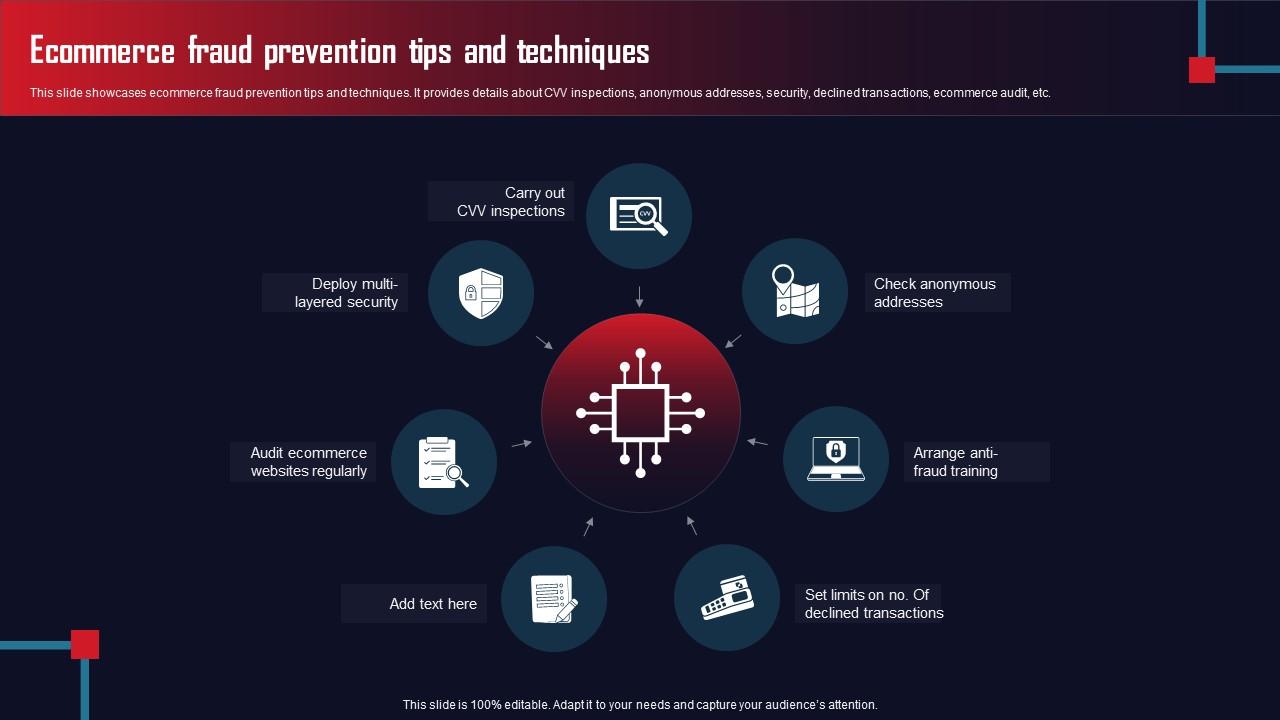
Application security for e-commerce websites is crucial to protect customer data and maintain trust. Implementing robust security measures can prevent data breaches and cyberattacks.
E-commerce websites handle sensitive customer information, making them prime targets for cyber threats. With the rise in online shopping, ensuring application security is more important than ever. Vulnerabilities can lead to financial losses and damage to your brand reputation. Businesses must adopt a proactive security posture by using tools and best practices tailored for e-commerce.
This includes regular security assessments, encryption protocols, and secure coding practices. By prioritizing application security, companies can foster customer trust and encourage repeat business, ultimately leading to sustainable growth in the competitive online marketplace.

Credit: www.slideteam.net
E-commerce Vulnerabilities
E-commerce websites face many vulnerabilities. Cybercriminals target these sites to steal sensitive data. Understanding these vulnerabilities helps in protecting your business.
Common Security Threats
Several common security threats affect e-commerce websites:
- SQL Injection: Attackers insert malicious SQL queries.
- XSS (Cross-Site Scripting): Attackers inject scripts into web pages.
- Phishing: Fraudulent attempts to steal personal information.
- DDoS Attacks: Overloading servers to disrupt service.
- Malware: Malicious software that can compromise data.
Protect against these threats with the right tools and practices.
Impact Of Data Breaches
Data breaches can have severe consequences:
| Impact | Description |
|---|---|
| Financial Loss | Costs from fines, legal fees, and loss of revenue. |
| Reputation Damage | Loss of customer trust and brand value. |
| Legal Consequences | Potential lawsuits from affected customers. |
| Operational Disruption | Time and resources spent on recovery efforts. |
Understanding these impacts helps in prioritizing security measures. Protect your e-commerce site from vulnerabilities to maintain customer trust.
Securing Customer Data
Protecting customer data is crucial for e-commerce websites. Customers share sensitive information like names, addresses, and payment details. A data breach can damage trust and lead to financial loss.
Encryption Techniques
Encryption protects data by converting it into a secure format. Only authorized users can read this data. Here are some important encryption techniques:
- SSL (Secure Sockets Layer): It creates a secure connection between the user’s browser and your server.
- TLS (Transport Layer Security): An updated version of SSL that provides stronger security.
- End-to-End Encryption: Data is encrypted on the sender’s side and decrypted on the receiver’s side.
Implementing these techniques keeps customer data safe from hackers. Regularly update your encryption methods to stay protected.
Secure Payment Gateways
Payment gateways process customer transactions securely. Choose a reliable payment gateway to ensure data security. Here are some factors to consider:
| Payment Gateway | Security Features |
|---|---|
| PayPal | Fraud detection, SSL encryption, buyer protection |
| Stripe | Tokenization, PCI compliance, strong encryption |
| Square | End-to-end encryption, fraud prevention, secure servers |
Opt for gateways that comply with PCI standards. This ensures your customers’ payment information stays confidential and secure.
Authentication And Access Control
Authentication and access control are vital for e-commerce security. They protect sensitive user data and prevent unauthorized access. Strong methods ensure that only genuine users can access accounts. Implementing effective authentication measures builds trust with customers.
Strong Password Policies
Strong password policies are the first line of defense. They help users create secure passwords. Here are key elements:
- Minimum length of 8 characters
- Use of uppercase and lowercase letters
- Inclusion of numbers and special characters
- No common words or easily guessed information
Encourage users to change passwords regularly. This reduces the chance of breaches. Consider implementing a password strength meter. It helps users create stronger passwords effectively.
Two-factor Authentication
Two-factor authentication (2FA) adds an extra security layer. It requires two forms of identification. This can be something the user knows and something they have. Here are common methods:
| Method | Description |
|---|---|
| SMS Codes | Users receive a code via text message. |
| Authenticator Apps | Apps generate time-sensitive codes. |
| Email Verification | A code is sent to the registered email. |
Implementing 2FA significantly reduces account hacking risks. Educate users on the importance of this feature. Make it easy to enable for all accounts.
Web Application Firewalls
Web Application Firewalls (WAFs) are crucial for e-commerce websites. They protect against online threats. WAFs monitor and filter traffic to your site. This helps to keep sensitive data safe. They block harmful requests and allow safe ones. Using a WAF enhances overall security.
Functionality Of Wafs
WAFs serve several key functions:
- Traffic Monitoring: WAFs inspect incoming and outgoing traffic.
- Threat Detection: They identify potential attacks like SQL injection.
- Request Filtering: WAFs allow or block requests based on rules.
- Data Protection: They safeguard sensitive information, like credit card data.
- Compliance: WAFs help meet security standards and regulations.
Choosing The Right Waf
Selecting the best WAF requires careful consideration. Here are some factors to think about:
| Factor | Importance |
|---|---|
| Scalability | WAFs should grow with your business. |
| Cost | Find a WAF within your budget. |
| Ease of Use | Choose a user-friendly interface. |
| Support | Look for reliable customer support. |
| Integration | Ensure it works well with your existing systems. |
Evaluate different WAF options to find the right fit. Check reviews and user feedback. Conduct trials when possible.
Regular Security Audits
Regular security audits are crucial for protecting e-commerce websites. They help identify vulnerabilities and weaknesses. By conducting these audits, you can secure customer data and build trust.
Frequent audits can prevent data breaches and enhance overall security. Focus on different aspects of your website. This includes application security, server configurations, and user access controls.
Conducting Penetration Testing
Penetration testing is a method to check for vulnerabilities. It simulates attacks on your website to find weaknesses.
- Choose skilled professionals for accurate testing.
- Schedule tests regularly, at least twice a year.
- Document findings to track improvements.
Penetration testing can uncover:
| Vulnerability Type | Description |
|---|---|
| SQL Injection | Manipulates database queries to gain unauthorized access. |
| XSS (Cross-Site Scripting) | Injects malicious scripts into web pages. |
| CSRF (Cross-Site Request Forgery) | Tricks users into executing unwanted actions. |
Automated Scanning Tools
Automated scanning tools help detect security issues quickly. They save time and provide regular assessments.
- Some popular tools include:
- OWASP ZAP – Free and open-source.
- Burp Suite – Offers both free and paid versions.
- Acunetix – Comprehensive web application scanner.
Automated tools can identify:
- Outdated software components
- Weak passwords
- Unpatched vulnerabilities
Use these tools alongside manual reviews for best results. Regular audits and automated scans lead to a more secure e-commerce site.
Secure Coding Practices
Secure coding practices are essential for protecting e-commerce websites. They help developers write safe and reliable code. This reduces vulnerabilities and enhances user trust.
Input Validation
Input validation is crucial for maintaining security. It ensures that user data is checked before processing. Follow these tips for effective input validation:
- Always validate user input on both client and server sides.
- Use whitelisting for accepted input types.
- Limit the length of input fields.
- Sanitize data to remove harmful characters.
Example of input validation in code:
function validateInput(input) {
    const regex = /^[a-zA-Z0-9]$/; // Only allow letters and numbers
    return regex.test(input);
}
Error Handling
Proper error handling protects sensitive information. It prevents attackers from gaining insights into your system. Implement these error handling practices:
- Do not reveal error messages to users.
- Log errors securely for internal review.
- Use generic error messages like “An error occurred.”
Sample error handling code:
try {
    // Your code here
} catch (error) {
    console.error("An error occurred. Please try again.");
}
By following these secure coding practices, e-commerce websites can minimize risks. This fosters a safer online shopping experience for customers.
Security Awareness Training
Security awareness training is vital for e-commerce websites. It helps employees understand security risks. Training empowers them to protect sensitive data. A well-trained team can reduce breaches significantly.
Educating Employees
Employees are the first line of defense. Education is essential to help them recognize threats. Use engaging methods for training, like:
- Interactive workshops
- Online courses
- Quizzes and assessments
Regular training sessions are crucial. Schedule them monthly or quarterly. Keep the content updated to reflect new threats. Encourage employees to ask questions and share experiences.
Creating A Security-focused Culture
Build a culture that prioritizes security. Make it a core value of your organization. Here are some steps to create this culture:
- Encourage open communication about security issues.
- Recognize and reward security-conscious behavior.
- Implement security policies that everyone must follow.
- Regularly share security updates and news.
A security-focused culture increases vigilance. Employees become more aware of potential threats. This proactive approach reduces risks for your e-commerce website.
Credit: www.slidegeeks.com
Compliance With Security Standards
Compliance with security standards is vital for e-commerce websites. It helps protect sensitive data and builds customer trust. Two major standards are PCI DSS and GDPR. Understanding them is crucial for online businesses.
Adhering To Pci Dss
PCI DSS stands for Payment Card Industry Data Security Standard. It sets requirements for organizations that handle credit cards. Compliance ensures that customer payment information is safe.
- Build and maintain a secure network.
- Protect cardholder data.
- Implement strong access control measures.
- Regularly monitor and test networks.
- Maintain an information security policy.
Meeting these requirements can reduce the risk of data breaches. Use tools like firewalls and encryption for added security. Regular audits can help maintain compliance.
Understanding Gdpr Implications
GDPR stands for General Data Protection Regulation. It governs how businesses handle personal data in the EU. Compliance is mandatory for any e-commerce site serving EU customers.
| GDPR Requirement | Description |
|---|---|
| Data Protection | Ensure personal data is protected. |
| User Consent | Obtain clear consent for data use. |
| Right to Access | Allow users to access their data. |
| Data Breach Notification | Notify users of data breaches within 72 hours. |
Non-compliance can lead to heavy fines. Keep your privacy policy updated. Train your staff on data protection practices.
Incident Response Planning
Incident response planning is vital for e-commerce websites. A well-prepared plan helps handle security breaches effectively. It minimizes damage and protects customer data. Quick response reduces downtime and builds customer trust.
Developing A Response Plan
Creating a solid response plan involves several key steps:
- Identify Roles: Assign team members to specific tasks.
- Establish Procedures: Outline steps for detecting and managing incidents.
- Set Communication Guidelines: Define how to inform stakeholders and customers.
- Conduct Training: Regularly train your team on the response plan.
- Review and Update: Regularly update the plan based on new threats.
Ensure your plan includes:
- Contact information for key personnel
- Tools for incident management
- A list of critical assets
Real-time Monitoring And Alerts
Real-time monitoring is essential for quick incident detection. Use tools that provide alerts for suspicious activities. Set up alerts for:
- Failed login attempts
- Unusual traffic spikes
- Unauthorized access attempts
Consider using the following tools:
| Tool Name | Features | Best For |
|---|---|---|
| Splunk | Log analysis, real-time monitoring | Large e-commerce sites |
| Loggly | Cloud-based log management | Small to medium businesses |
| Datadog | Performance monitoring, alerting | Application monitoring |
Real-time alerts help your team act swiftly. Quick action can stop a breach before it escalates.

Credit: blog.rsisecurity.com
Leveraging Cloud Security Advantages
Cloud security offers strong benefits for e-commerce websites. It protects sensitive data and enhances overall security. Using cloud services can improve performance and reduce costs. Here’s how to make the most of cloud security.
Benefits Of Cloud-based Solutions
- Scalability: Easily adjust resources as your business grows.
- Cost-Effectiveness: Pay only for what you use.
- Automatic Updates: Receive the latest security patches automatically.
- Data Redundancy: Backups are stored in multiple locations.
- Access Control: Manage who can see and use your data.
Ensuring Cloud Service Security
Cloud security is vital for e-commerce sites. Follow these tips to ensure safety:
- Choose Reputable Providers: Research cloud providers before selecting.
- Implement Strong Passwords: Use complex passwords for all accounts.
- Enable Two-Factor Authentication: Add extra layers of security.
- Regularly Monitor Activities: Keep track of all transactions and access.
- Encrypt Sensitive Data: Protect data both in transit and at rest.
| Security Feature | Description |
|---|---|
| Firewalls | Blocks unauthorized access to your cloud environment. |
| Intrusion Detection | Monitors for suspicious activities and alerts you. |
| Data Encryption | Secures data by converting it into unreadable code. |
| Access Management | Controls who can access your cloud resources. |
Utilizing cloud security tools helps maintain a secure e-commerce environment. Keep your customers’ data safe and build trust. Cloud security is essential for your e-commerce success.
Frequently Asked Questions
What Is Application Security For E-commerce Websites?
Application security for e-commerce websites involves protecting applications from threats and vulnerabilities. It includes practices and tools to secure software, ensuring safe transactions and data integrity. This is crucial for maintaining customer trust and preventing financial loss. Effective application security measures are essential for any online business.
Why Is Application Security Important For Online Stores?
Application security is vital for online stores because it protects sensitive customer data. Breaches can lead to significant financial loss and damage to reputation. With increasing cyber threats, ensuring robust security measures helps build customer confidence. Secure applications also comply with regulations, avoiding legal issues for businesses.
What Are Common Application Security Threats?
Common application security threats include SQL injection, cross-site scripting, and data breaches. These vulnerabilities can compromise user data and disrupt services. Attackers often exploit weak security measures to gain unauthorized access. Understanding these threats helps e-commerce sites implement effective security strategies to mitigate risks.
How Can I Secure My E-commerce Application?
To secure your e-commerce application, implement strong authentication protocols and regularly update software. Use encryption for sensitive data and conduct regular security audits. Employ security tools such as firewalls and intrusion detection systems. Educate your team on security best practices to foster a culture of vigilance.
Conclusion
Securing your e-commerce website is crucial for protecting customer data and building trust. Implementing strong security measures and utilizing the right tools can significantly reduce risks. Regular updates and employee training further enhance your defenses. Prioritize application security to ensure a safe shopping experience for your customers and safeguard your business’s reputation.


Leave a Reply