
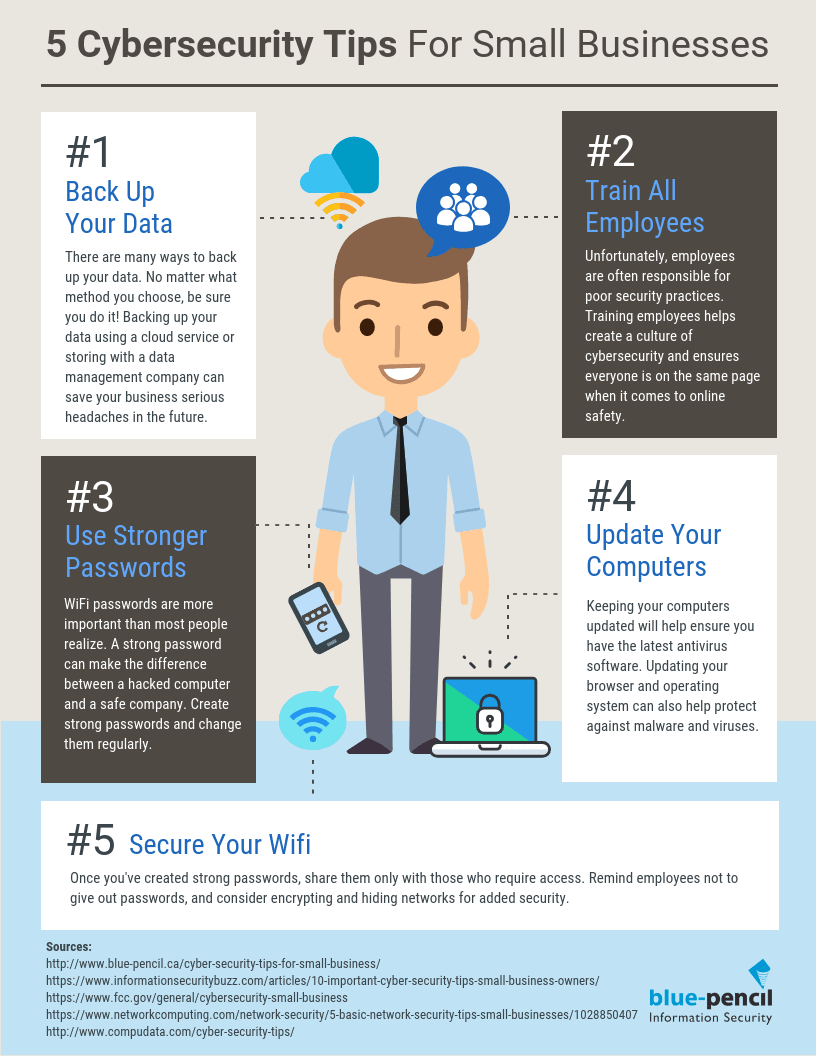
Best practices for information security management in small businesses include implementing strong access controls and conducting regular security training for employees. Regularly updating software and creating an incident response plan are also essential.
Best Practices for InfoSec in SMEs:Small businesses often face unique challenges regarding information security. Limited resources and staff can make them vulnerable to cyber threats. Adopting effective security measures is crucial for protecting sensitive data and maintaining customer trust. By prioritizing information security, small businesses can safeguard their operations and reduce the risk of costly breaches.
Implementing best practices not only mitigates risks but also enhances overall business resilience. Emphasizing employee awareness and utilizing technology effectively will create a robust security environment. By fostering a culture of security, small businesses can navigate the digital landscape confidently.
Credit: ifeeltech.com
Introduction To Infosec In Smes
Information security, or InfoSec, is vital for small and medium enterprises (SMEs). These businesses hold sensitive data that hackers target. Protecting this information is crucial for maintaining trust and compliance.
Implementing strong security practices can save SMEs from costly breaches. Understanding the specific needs and risks is the first step toward effective security.
Importance Of Cybersecurity
Cybersecurity is essential for every business, especially SMEs. Here are key reasons why:
- Data Protection: Safeguards customer and business information.
- Reputation Management: Builds trust with customers and partners.
- Financial Security: Prevents costly data breaches and fines.
- Compliance: Meets legal and industry regulations.
SMEs often lack resources. Strong cybersecurity can level the playing field against larger competitors.
Unique Challenges For Small And Medium Enterprises
SMEs face specific challenges in information security:
| Challenge | Description |
|---|---|
| Limited Budget | Few financial resources for advanced security tools. |
| Lack of Expertise | Often lack dedicated IT security staff. |
| Inadequate Training | Employees may not understand security protocols. |
| Increased Cyber Threats | Cyber attacks target smaller businesses more frequently. |
Addressing these challenges is essential. SMEs must prioritize security to protect their assets.
Conducting Risk Assessments
Conducting risk assessments is vital for small businesses. It helps identify threats and vulnerabilities. This process protects sensitive information and builds trust with customers.
Identifying Potential Threats
Understanding potential threats is the first step. These threats can harm your business. Common threats include:
- Cyber attacks
- Data breaches
- Natural disasters
- Employee negligence
To identify these threats, small businesses should:
- Review past incidents.
- Consult industry reports.
- Engage with security experts.
Evaluating Vulnerabilities
Once threats are identified, evaluate vulnerabilities. Vulnerabilities are weaknesses that allow threats to cause damage. Common vulnerabilities include:
- Outdated software
- Poor password management
- Inadequate employee training
- Weak network security
Use the following methods for evaluation:
| Method | Description |
|---|---|
| Security Audits | Regular checks for security compliance. |
| Pentesting | Simulated attacks to find weaknesses. |
| Employee Surveys | Gather feedback on security practices. |
Addressing these vulnerabilities improves security. A proactive approach keeps your business safe.
Establishing A Security Culture
Creating a strong security culture is essential for small businesses. It helps protect sensitive data. Employees play a key role in this process. Their awareness and actions can make a big difference.
Training Employees
Training is the foundation of a secure workplace. Regular training sessions keep employees informed. Here are some effective training practices:
- Conduct onboarding sessions for new hires.
- Offer refresher courses every six months.
- Use real-life examples to illustrate threats.
- Implement hands-on simulations for practical experience.
Employees should understand:
- What constitutes sensitive information.
- How to recognize phishing attempts.
- Safe password practices.
Promoting Security Awareness
Awareness is crucial for a security culture. Small businesses must encourage proactive behavior. Consider these strategies:
- Display security reminders around the office.
- Share monthly newsletters with security tips.
- Organize security awareness days.
Engage employees with interactive activities:
| Activity | Description |
|---|---|
| Quizzes | Test knowledge on security practices. |
| Workshops | Hands-on sessions to address real-world issues. |
Encourage employees to report security concerns. Create an open environment for discussions. This builds trust and improves security practices.
Implementing Strong Access Controls
Strong access controls protect sensitive data in small businesses. They limit who can view or edit information. This helps prevent unauthorized access and data breaches. Two key strategies include role-based access management and multi-factor authentication.
Role-based Access Management
Role-based access management (RBAC) assigns permissions based on job roles. This ensures employees only access necessary information. Here are some benefits of RBAC:
- Improved Security: Limits access to sensitive data.
- Simplified Management: Easier to manage user permissions.
- Clear Accountability: Tracks who accessed what data.
To implement RBAC, follow these steps:
- Identify roles within the organization.
- Define access levels for each role.
- Assign users to their respective roles.
- Regularly review and update access permissions.
Use Of Multi-factor Authentication
Multi-factor authentication (MFA) adds an extra layer of security. It requires users to provide two or more verification methods. This makes unauthorized access much harder. Here’s how MFA works:
| Factor Type | Description |
|---|---|
| Something You Know | Password or PIN. |
| Something You Have | Smartphone app or hardware token. |
| Something You Are | Fingerprint or facial recognition. |
To set up MFA:
- Choose a reliable MFA solution.
- Enable MFA for all user accounts.
- Educate employees on using MFA.
Implementing strong access controls protects your business. RBAC and MFA are essential for maintaining information security.
Regular Software Updates And Patch Management
Regular software updates and patch management are vital for small businesses. These practices protect systems from vulnerabilities. They ensure software runs smoothly and securely. Ignoring updates can lead to serious security risks.
Staying Current With Updates
Staying current with software updates is crucial. Updates often fix security flaws. They can improve software performance and add new features.
Here are some key points about staying updated:
- Check for updates regularly.
- Enable automatic updates when possible.
- Monitor vendor announcements for critical updates.
Use a simple checklist to track updates:
| Software | Last Update | Next Check Date |
|---|---|---|
| Operating System | 01/10/2023 | 15/10/2023 |
| Antivirus | 05/10/2023 | 19/10/2023 |
| Productivity Suite | 10/09/2023 | 24/10/2023 |
Automating Patch Deployment
Automating patch deployment saves time and effort. It ensures all systems receive updates promptly. Manual updates can lead to missed patches.
Benefits of automation include:
- Consistent and timely updates.
- Reduced risk of human error.
- Better compliance with security policies.
Consider these steps for automation:
- Select a patch management tool.
- Set up schedules for automatic updates.
- Test patches in a safe environment first.
Regular software updates and effective patch management create a strong defense. Small businesses can protect valuable data and maintain trust.
Data Protection Strategies
Data protection is vital for small businesses. Proper strategies keep sensitive information safe. Here are key methods to secure your data.
Encryption And Backup Solutions
Encryption makes data unreadable without a key. It protects data during transfer and storage. Use strong algorithms like AES-256 for encryption.
Regular backups are essential. They prevent data loss due to theft or hardware failure. Follow these steps for effective backups:
- Use reliable backup software.
- Store backups in multiple locations.
- Schedule automatic backups.
- Test backup recovery regularly.
Consider the following table for backup solutions:
| Backup Solution | Pros | Cons |
|---|---|---|
| Cloud Storage | Accessible anywhere, scalable | Monthly fees, internet dependency |
| External Hard Drives | One-time purchase, no monthly fees | Physical damage risk, limited access |
| NAS (Network-Attached Storage) | Centralized access, easy sharing | Initial setup cost, maintenance |
Handling Sensitive Information
Small businesses often deal with sensitive information. Protect this data to avoid breaches. Follow these best practices:
- Limit access to sensitive data.
- Train employees on data security.
- Use strong passwords and change them often.
- Implement multi-factor authentication.
- Regularly review data access permissions.
Encrypt sensitive emails and files. This adds an extra layer of security. Always dispose of sensitive information properly.
Use shredders for physical documents. For digital data, use secure deletion tools. Keeping sensitive data secure helps build trust with customers.
Incident Response Planning
Incident Response Planning is vital for small businesses. It helps manage security threats effectively. A well-prepared response plan minimizes damage and recovery time. Each business must tailor their plan to fit their needs.
Developing A Response Plan
Creating an effective response plan involves several steps:
- Identify potential threats: List possible security incidents.
- Assign roles: Designate team members for specific tasks.
- Define procedures: Outline steps to take during an incident.
- Establish communication: Set up channels for reporting and updates.
- Review and revise: Regularly update the plan based on new threats.
Consider these elements for your response plan:
| Element | Description |
|---|---|
| Threat Assessment | Analyze risks specific to your business. |
| Response Team | Form a group responsible for managing incidents. |
| Communication Protocol | Define how to share information during an event. |
| Post-Incident Review | Evaluate the response after an incident. |
Simulating Security Incidents
Simulating security incidents is crucial for preparedness. Practice scenarios help identify weaknesses in your response plan. Conduct regular drills with your team to improve their skills.
Follow these steps for effective simulations:
- Choose a scenario: Select a realistic incident to practice.
- Set objectives: Define what you want to achieve.
- Conduct the drill: Execute the simulation with your team.
- Review results: Analyze the performance and identify areas for improvement.
Regular simulations build confidence. They ensure everyone knows their roles during a real incident. This proactive approach enhances your overall security posture.
Compliance With Industry Standards And Regulations
Compliance with industry standards and regulations is crucial for small businesses. It protects data and builds customer trust. Understanding these requirements helps ensure safety and legal standing.
Understanding Relevant Regulations
Small businesses must know the regulations that apply to them. Here are some key regulations:
- GDPR: Governs data protection in the EU.
- HIPAA: Protects health information in the U.S.
- PCI DSS: Secures credit card transactions.
- COPPA: Protects children’s online privacy.
Understanding these regulations helps avoid fines. Each regulation has specific requirements. Small businesses must assess their operations against these standards.
Achieving And Maintaining Compliance
Achieving compliance involves several steps:
- Identify applicable regulations.
- Conduct a risk assessment.
- Implement necessary security measures.
- Train employees on compliance practices.
- Monitor and review compliance regularly.
Maintaining compliance is ongoing. Regular audits help identify gaps. Use the following table for compliance tips:
| Tip | Description |
|---|---|
| Document Policies | Keep records of compliance measures. |
| Regular Training | Update staff on compliance changes. |
| Incident Response Plan | Prepare for data breaches effectively. |
Following these steps helps ensure compliance. Strong compliance reduces risks and enhances business reputation.
Investing In Reliable Security Tools
Small businesses often face unique security challenges. Investing in reliable security tools protects data and builds trust. Effective tools help prevent breaches and ensure compliance. Choosing the right solutions can be a game-changer.
Selecting The Right Tools For Smes
Choosing security tools for small and medium enterprises (SMEs) requires careful consideration. Here are key factors to remember:
- Budget: Focus on cost-effective options.
- Scalability: Ensure tools grow with your business.
- Ease of Use: Select user-friendly solutions.
- Support: Look for strong customer service.
Consider the following tools:
| Tool Type | Examples | Key Benefits |
|---|---|---|
| Antivirus Software | Norton, McAfee | Protects against malware and viruses. |
| Firewalls | ZoneAlarm, Cisco | Blocks unauthorized access to networks. |
| Backup Solutions | Acronis, Backblaze | Safeguards data from loss. |
Integrating Security Solutions
Integrating multiple security solutions enhances overall protection. Follow these steps to ensure smooth integration:
- Assess Needs: Identify specific security requirements.
- Choose Compatible Tools: Ensure tools work well together.
- Establish Policies: Create clear security guidelines.
- Train Employees: Educate staff on new tools.
Regularly review and update security tools. Stay informed about the latest threats. This proactive approach helps maintain robust security.
Partnering With Security Experts
Small businesses often lack the resources for strong cybersecurity. Partnering with security experts can fill this gap. These experts provide essential skills and tools. They help protect sensitive data and reduce risks.
Benefits Of Managed Security Services
- Cost-Effective: Managed services often cost less than in-house teams.
- 24/7 Monitoring: Experts watch for threats around the clock.
- Access to Expertise: Gain knowledge from professionals in the field.
- Scalability: Services can grow with your business needs.
- Focus on Core Business: Spend time on growth, not security worries.
Choosing The Right Cybersecurity Partner
Selecting a cybersecurity partner is crucial. Consider these factors:
- Experience: Look for a partner with a strong track record.
- Certifications: Ensure they hold relevant industry certifications.
- Service Offerings: Check if they provide the services you need.
- Customer Support: Assess their support response time and availability.
- Reviews: Read testimonials and reviews from other businesses.
Finding the right partner enhances your security strategy. It protects your business from cyber threats.
Continuous Monitoring And Review
Continuous monitoring and review are vital for small businesses. They help protect sensitive data. Regular checks identify risks and improve security measures. Implementing strong strategies saves money and time.
Implementing Surveillance Systems
Surveillance systems act as a watchful eye. They help detect suspicious activities. Here are some effective strategies:
- Video Cameras: Install cameras in key areas.
- Access Control: Use keycards for sensitive areas.
- Alarm Systems: Set alarms for unauthorized access.
- Remote Monitoring: Allow staff to monitor systems from anywhere.
These systems provide real-time information. They help in quick decision-making. Regularly review footage and logs to find patterns.
Conducting Regular Security Audits
Regular security audits help identify weaknesses. They ensure that all systems are up-to-date. Follow these steps for effective audits:
- Schedule Audits: Set a specific time each month.
- Check Compliance: Ensure all policies are followed.
- Review Access Logs: Look for unusual activities.
- Update Software: Install the latest security patches.
- Train Employees: Provide regular training on security practices.
Use a checklist for audits. This keeps the process organized. Here’s a simple checklist:
| Audit Task | Status |
|---|---|
| Check firewalls | Complete |
| Review user permissions | Pending |
| Update antivirus software | Complete |
| Conduct phishing tests | In Progress |
Regular audits keep your business safe. They help you stay ahead of threats.

Credit: pegasustechnologies.com

Credit: life.ieee.org
Frequently Asked Questions
What Are Key Security Practices For Small Businesses?
Key security practices for small businesses include regular software updates, strong password policies, and employee training. Implementing firewalls and antivirus software is essential. Regularly backing up data can prevent loss from cyberattacks. Also, consider conducting security audits to identify vulnerabilities in your systems.
How Can Small Businesses Protect Sensitive Data?
Small businesses can protect sensitive data by encrypting information and using secure connections. Employee training is vital to prevent phishing attacks. Implementing access controls ensures only authorized personnel can access sensitive data. Regularly reviewing security policies helps maintain data protection standards and compliance.
Why Is Employee Training Important For Security?
Employee training is crucial for security as employees are often the first line of defense. Well-trained staff can recognize phishing attempts and suspicious activities. Regular training ensures everyone understands security protocols and the importance of safeguarding company data. This reduces the risk of human errors leading to breaches.
What Tools Help Improve Information Security?
Tools that enhance information security include firewalls, antivirus software, and intrusion detection systems. Password management tools can help maintain strong passwords. Additionally, data encryption tools protect sensitive information. Regular security audits and vulnerability scanners can identify weaknesses in your systems, ensuring proactive measures are taken.
Conclusion
Effective information security management is essential for small businesses. Implementing strong policies, regular training, and robust technology can safeguard your data. Regular audits and updates keep your systems secure and compliant. Prioritizing these practices not only protects your business but also builds trust with your clients and partners.
Stay proactive to ensure lasting security.




Leave a Reply