
To secure sensitive data on cloud storage platforms, use strong encryption methods and implement multi-factor authentication. Regularly review access controls and maintain updated software to protect against vulnerabilities.
Steps to Secure Sensitive Data:As businesses increasingly rely on cloud storage, safeguarding sensitive data becomes crucial. Cloud platforms offer convenience and scalability, but they also pose significant security risks. Data breaches can lead to financial loss and reputational damage. Protecting sensitive information requires a proactive approach to security.
Effective strategies include implementing robust encryption, conducting regular security audits, and educating employees about best practices. By prioritizing data security, organizations can confidently leverage cloud technology while minimizing risks. Understanding the importance of these steps is essential for maintaining trust and compliance in today’s digital landscape.
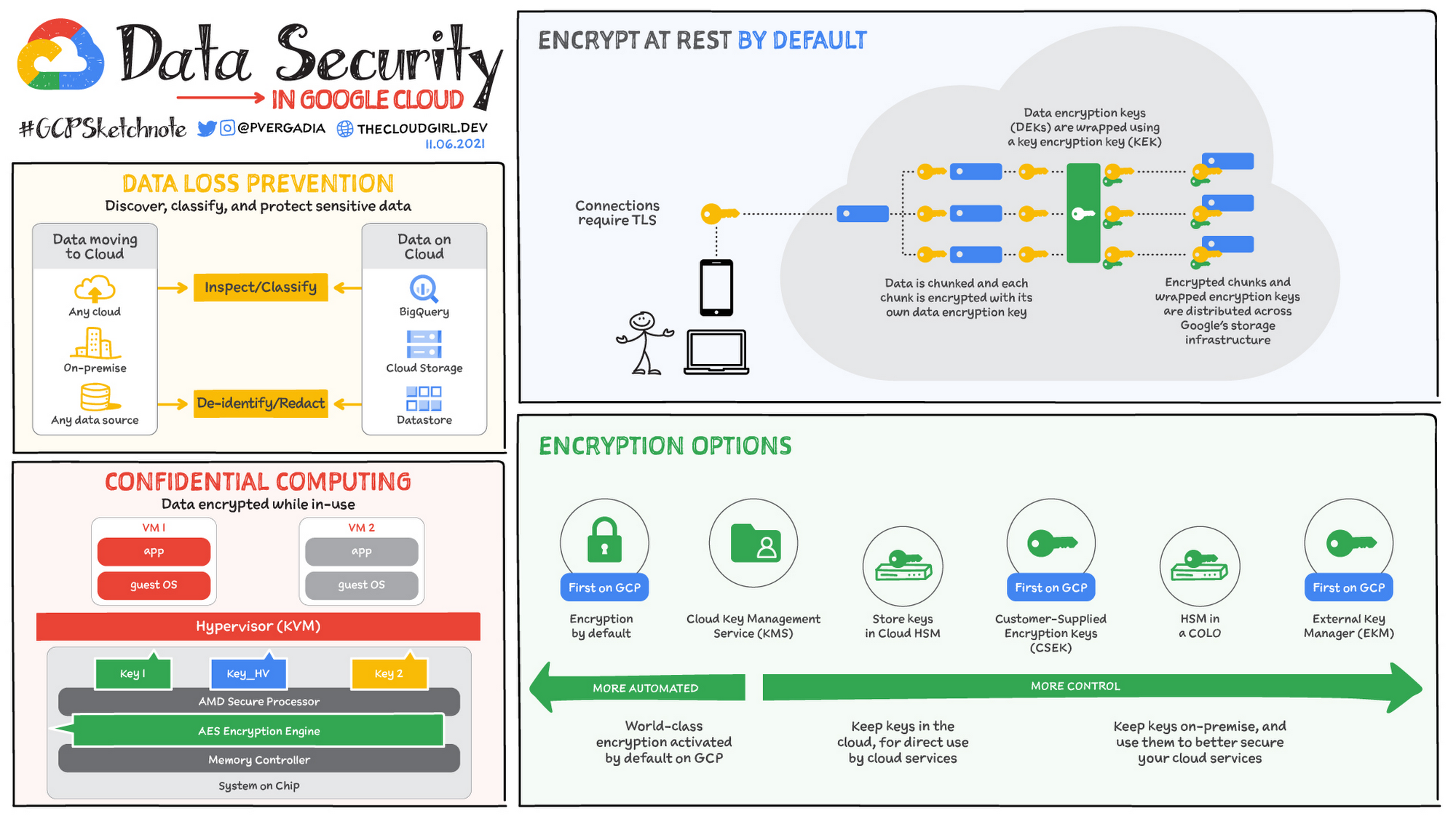
Credit: cloud.google.com
Introduction To Data Security In The Cloud
Data security in the cloud is vital for businesses today. As companies store sensitive information online, protecting this data becomes crucial. Understanding the risks and implementing security measures is essential.
Rise Of Cloud Computing
Cloud computing has grown rapidly. Businesses use it for storage and access to data. Here are some key points:
- Cost-effective solutions
- Scalability for growth
- Remote access to data
- Collaboration made easy
This rise brings new challenges in data security. Cyber threats can compromise sensitive information stored in the cloud.
Importance Of Data Protection
Data protection is crucial for any organization. Secure data means trust from customers and partners. Here are some reasons why data protection matters:
- Prevents data breaches
- Maintains customer trust
- Complies with regulations
- Safeguards reputation
Failure to protect data can lead to severe consequences. Organizations must prioritize data security in their cloud strategies.
Identifying Sensitive Data
Identifying sensitive data is crucial for cloud security. This step ensures you know what needs protection. Sensitive data can lead to significant risks if exposed. Understanding its types helps create effective security measures.
Types Of Sensitive Information
Different types of sensitive information require special attention. Here are some common categories:
- Personal Identifiable Information (PII)
- Name
- Address
- Social Security Number
- Financial Information
- Bank Account Numbers
- Credit Card Details
- Investment Records
- Health Information
- Medical Records
- Health Insurance Information
- Prescriptions
- Intellectual Property
- Trade Secrets
- Proprietary Designs
- Research Data
Data Classification Best Practices
Classifying data helps in managing it better. Here are best practices for data classification:
- Identify Data Owners
Assign responsibility for each data type.
- Define Classification Levels
Use categories like Public, Internal, Confidential, and Restricted.
- Implement Consistent Labels
Use clear labels for easy identification.
- Regularly Review Classifications
Update classifications based on changing data needs.
- Train Employees
Ensure everyone understands the importance of data classification.
Following these practices helps protect sensitive information effectively.
Choosing The Right Cloud Service Provider
Choosing the right cloud service provider is crucial for data security. Not all providers offer the same level of protection. It’s essential to evaluate their security features, compliance, and data center safety. This decision impacts how well your sensitive data is protected.
Security Credentials And Compliance
Cloud providers must have strong security credentials. Look for certifications that validate their security practices. Here are some key certifications to consider:
- ISO 27001: International standard for information security management.
- PCI DSS: Standards for securing credit card transactions.
- HIPAA: Regulations for protecting healthcare information.
Check if the provider complies with relevant laws. Compliance ensures they follow industry standards. This protects your data from breaches and unauthorized access.
Evaluating Data Center Security
Data center security is critical for cloud storage. Evaluate the physical and digital security measures. Consider these factors:
| Security Feature | Description |
|---|---|
| Access Control | Limited access to authorized personnel only. |
| Surveillance | 24/7 video monitoring of the facility. |
| Fire Suppression | Systems to prevent fire damage. |
| Backup Power | Generators to ensure uptime during outages. |
Assess their disaster recovery plans. Ensure they have strategies for data recovery. A reliable provider safeguards your data against loss and breaches.

Credit: www.spiceworks.com
Implementing Strong Authentication Measures
Strong authentication measures protect sensitive data stored in the cloud. They prevent unauthorized access and reduce risks. Using effective strategies boosts security for individuals and organizations.
The Role Of Multi-factor Authentication
Multi-Factor Authentication (MFA) adds an extra layer of security. It requires users to provide two or more verification factors. This makes it harder for attackers to gain access.
- Something you know: A password or PIN.
- Something you have: A smartphone or security token.
- Something you are: Biometric data, like fingerprints.
Using MFA significantly reduces the chances of unauthorized access. Implementing MFA on cloud storage platforms is simple and effective.
Password Policies And Best Practices
Strong passwords are essential for protecting sensitive data. Follow these best practices for creating secure passwords:
- Use at least 12 characters.
- Include a mix of uppercase and lowercase letters.
- Add numbers and special characters.
- Avoid common words or phrases.
- Change passwords regularly.
Employing a password manager can help users generate and store strong passwords. Regularly reviewing and updating password policies enhances security.
| Best Practice | Description |
|---|---|
| Regular Updates | Change passwords every 3 to 6 months. |
| Unique Passwords | Use different passwords for every account. |
| Two-Step Verification | Enable two-step verification for all accounts. |
Implementing strong passwords and MFA strengthens your cloud storage security. Prioritizing these measures helps protect sensitive data effectively.
Data Encryption Strategies
Data encryption is crucial for protecting sensitive information in cloud storage. It ensures that only authorized users can access your data. Implementing effective encryption strategies enhances your data security significantly.
At-rest And In-transit Encryption
Data can be vulnerable both at rest and in transit. Understanding these two states is vital for effective encryption.
- At-Rest Encryption: This protects data stored on servers. It keeps your data safe from unauthorized access.
- In-Transit Encryption: This secures data while it moves across networks. It prevents interception during transmission.
Utilize the following encryption methods:
| Encryption Type | Description | Use Case |
|---|---|---|
| AES (Advanced Encryption Standard) | Symmetric encryption for data at rest. | Files stored in cloud storage. |
| SSL/TLS | Protocol for securing data in transit. | Web applications and API communications. |
| PGP (Pretty Good Privacy) | Encrypts emails and files. | Email communications. |
Key Management Considerations
Effective key management is essential for encryption success. It ensures that your encryption keys are secure and accessible only to authorized users.
- Key Generation: Use strong, random keys. Avoid predictable patterns.
- Key Storage: Store keys in a secure location. Use hardware security modules (HSM) for added protection.
- Key Rotation: Regularly change encryption keys. This limits the impact of a key compromise.
- Access Control: Restrict key access to authorized personnel only. Implement role-based access controls.
Implement these strategies to enhance your data security in cloud storage.
Regular Security Audits And Compliance Checks
Regular security audits and compliance checks are essential for protecting sensitive data. These measures ensure that cloud storage platforms remain secure and compliant with regulations. Frequent assessments help identify vulnerabilities and ensure data integrity.
Scheduling Audits
Scheduling security audits is crucial for maintaining data security. Follow these steps to implement an effective audit schedule:
- Identify Audit Frequency: Decide how often to conduct audits. Monthly, quarterly, or bi-annually are common choices.
- Assign Responsibilities: Designate team members to conduct audits. Ensure they have the necessary skills.
- Create an Audit Checklist: Develop a checklist that covers all security aspects.
- Set Clear Deadlines: Establish deadlines for each audit. This keeps the process on track.
- Document Findings: Record all findings and recommendations. Use this information for improvements.
Staying Compliant With Regulations
Compliance with regulations is vital for data protection. Different regulations apply to various industries. Here are some key regulations:
| Regulation | Industry | Key Focus |
|---|---|---|
| GDPR | General | Data privacy and protection |
| HIPAA | Healthcare | Patient data protection |
| PCI DSS | Finance | Credit card transaction security |
To ensure compliance:
- Stay updated on regulatory changes.
- Conduct regular training for employees.
- Implement strong access controls.
- Document all compliance efforts thoroughly.
Access Control And User Permissions
Access control and user permissions are vital for protecting sensitive data. They help ensure only authorized users can access important information. Proper management can prevent data breaches and unauthorized access.
Least Privilege Principle
The Least Privilege Principle means giving users the minimum access they need. This minimizes risks and limits potential damage. Here’s how to implement it:
- Identify user roles and responsibilities.
- Assign permissions based on those roles.
- Regularly review and adjust permissions.
For example, an employee in sales needs access to customer data, but not to financial records. Limiting access helps protect sensitive information.
Monitoring And Managing Access
Regularly monitoring and managing access is crucial. It helps track who accesses data and when. Use the following strategies:
- Set up alerts for unusual access patterns.
- Conduct regular audits of user permissions.
- Utilize logging features to track data access.
Consider using a table to summarize access management practices:
| Practice | Description |
|---|---|
| Alerts | Notify admins of unauthorized access attempts. |
| Audits | Review user permissions regularly. |
| Logging | Keep records of data access for security audits. |
Effective monitoring can spot potential threats early. Stay proactive to protect your cloud storage.
Educating Employees On Cloud Security
Employees are the first line of defense in cloud security. Their knowledge can prevent data breaches. Educating them on security practices is essential. Proper training reduces risks and strengthens security measures.
Training Programs
Structured training programs are vital for enhancing security awareness. Regular sessions keep employees informed about cloud security risks. Here are some effective training strategies:
- Interactive workshops
- Online courses
- Simulation exercises
- Regular quizzes to assess knowledge
Make training engaging. Use real-world scenarios to illustrate risks. Highlight the importance of security in daily tasks.
Phishing And Social Engineering
Phishing attacks trick employees into revealing sensitive information. Understanding these tactics is crucial. Educate employees on how to recognize phishing attempts.
| Phishing Signs | Response |
|---|---|
| Unusual email addresses | Do not click any links |
| Urgent requests for personal info | Verify with the sender |
| Generic greetings | Look for personalized details |
Social engineering manipulates people into breaking security rules. Teach employees to question unexpected requests. Encourage them to report suspicious activity.
Regularly review training materials. Update them to reflect new threats. This keeps employees alert and informed.
Incident Response And Recovery Plans
Securing sensitive data on cloud storage requires a solid response plan. An incident response plan helps you act quickly during data breaches. Recovery plans ensure data is restored effectively. Both plans protect your information and maintain trust with users.
Developing A Response Strategy
A strong response strategy outlines steps to take during a data breach. Here are key elements:
- Identify the type of incident.
- Assess the impact on your data.
- Contain the breach to prevent further damage.
- Notify stakeholders and affected parties.
- Document all actions taken.
Regular training keeps your team prepared. Simulate scenarios to test your response strategy. This builds confidence and improves efficiency.
Backup And Restoration Procedures
Regular backups are crucial for data recovery. Follow these best practices:
- Automate backups to ensure consistency.
- Store backups in a separate location.
- Test restoration processes frequently.
- Encrypt backup data for added security.
Use a reliable cloud storage provider. Choose one with built-in backup features. This minimizes data loss during an incident.
| Backup Frequency | Recommended Action |
|---|---|
| Daily | For critical data, use daily backups. |
| Weekly | For less critical data, consider weekly backups. |
| Monthly | Archive old data monthly for long-term storage. |
Implement these strategies to secure sensitive data. They will help you recover quickly during an incident.
Credit: www.montecarlodata.com
Embracing Continuous Improvement
To secure sensitive data on cloud storage, organizations must embrace continuous improvement. This approach helps adapt to new challenges. Security is not a one-time task. It requires ongoing effort and updates.
Staying Informed On Emerging Threats
Awareness of new threats is crucial. Cybercriminals constantly develop innovative methods. Regularly monitor security news and updates. Follow industry leaders and security experts.
- Subscribe to cybersecurity newsletters.
- Join online forums and communities.
- Attend webinars and conferences.
Use threat intelligence platforms. These platforms provide timely insights. They help identify vulnerabilities and potential attacks.
Regularly Updating Security Measures
Regular updates keep your defenses strong. Review security policies and protocols frequently. Implement the following measures:
- Change passwords regularly.
- Enable multi-factor authentication.
- Conduct security audits.
Use automated tools for updates. These tools can patch vulnerabilities quickly. A proactive approach reduces risks. Always train employees on security best practices.
| Security Measure | Frequency |
|---|---|
| Password Changes | Every 3 months |
| Security Audits | Bi-annually |
| Software Updates | Monthly |
Embrace a culture of security. Encourage feedback and suggestions. This helps create a secure environment for sensitive data.
Frequently Asked Questions
How Can I Encrypt Data In The Cloud?
You can encrypt data in the cloud using built-in tools provided by cloud storage platforms. Additionally, third-party encryption software can enhance security. Always ensure encryption keys are stored securely. This practice minimizes the risk of unauthorized access to your sensitive information.
What Are Best Practices For Cloud Storage Security?
Best practices include using strong passwords, enabling two-factor authentication, and regularly updating software. Also, conduct routine security audits and limit access to sensitive data. Regularly back up your data and monitor for suspicious activity. These steps significantly improve your cloud security posture.
How Do I Choose A Secure Cloud Provider?
To choose a secure cloud provider, evaluate their security certifications and compliance with industry standards. Research their encryption methods and data protection policies. Customer reviews and case studies can offer insights. Always opt for providers with a proven track record of security and reliability.
Is Two-factor Authentication Necessary For Cloud Storage?
Yes, two-factor authentication (2FA) is essential for cloud storage security. It adds an extra layer of protection beyond just a password. With 2FA, even if a password is compromised, unauthorized access is prevented. This significantly reduces the risk of data breaches.
Conclusion
Securing sensitive data on cloud storage is vital for protecting your information. By following the outlined steps, you can significantly reduce risks. Implement strong passwords, enable encryption, and regularly update your security measures. Taking these actions ensures your data remains safe and your peace of mind is intact.
Protect your digital assets today.




Leave a Reply