
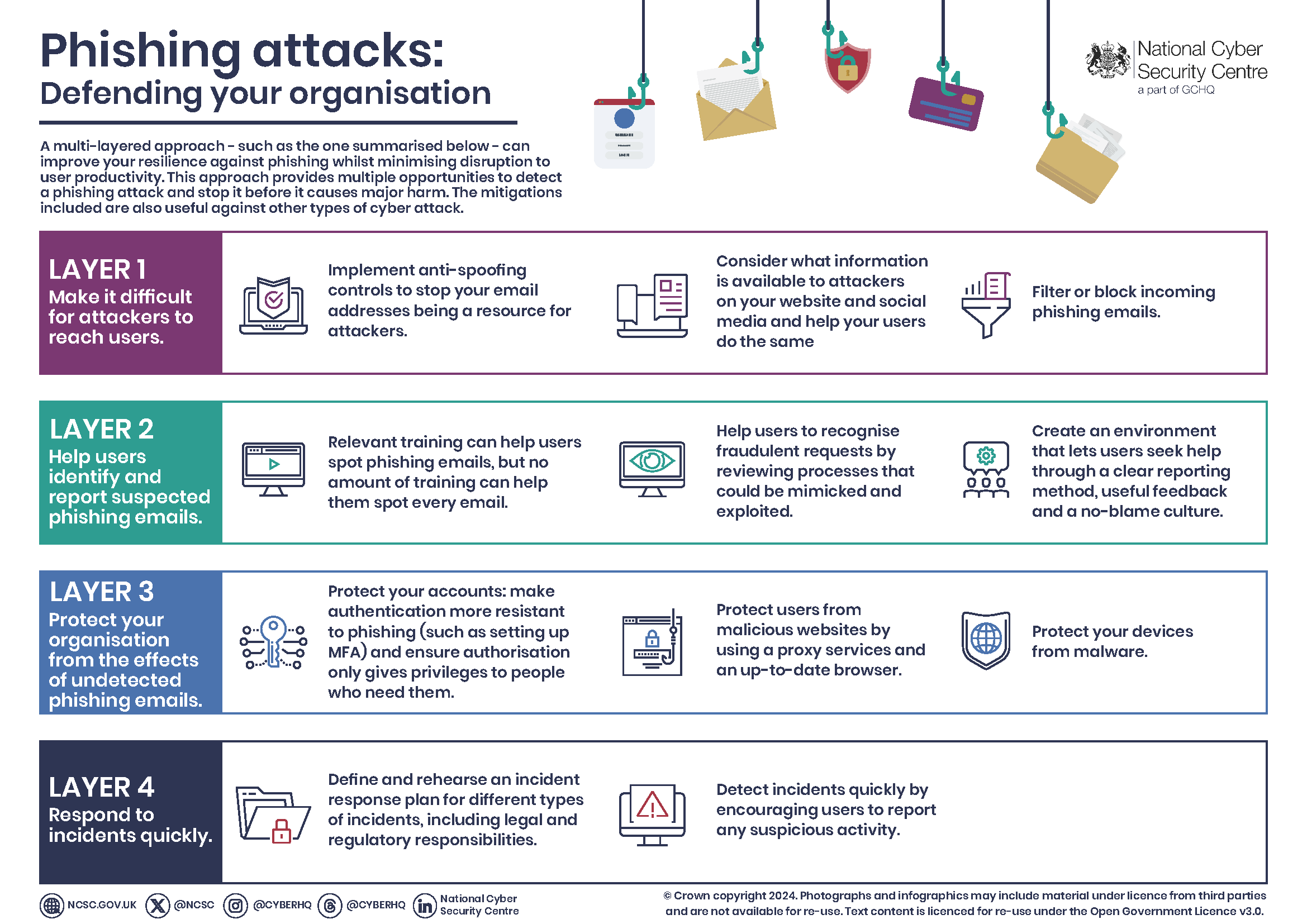
Phishing attacks trick users into revealing sensitive information. Identifying and preventing these attacks is crucial for organizational security.
Guide to Identifying And Preventing Phishing Attacks in Organizations:Phishing attacks remain a significant threat to organizations, targeting employees through deceptive emails and messages. These attacks often appear legitimate, making it easy for individuals to fall victim. By understanding the common signs of phishing, organizations can empower their workforce to recognize and respond appropriately.
Training employees to spot suspicious links and attachments is essential. Implementing robust security measures, such as multi-factor authentication, adds an extra layer of protection. Regular updates to security protocols keep defenses strong against evolving threats. A proactive approach to identifying and preventing phishing attacks not only safeguards sensitive data but also fosters a culture of security awareness within the organization.
Introduction To Phishing Threats In The Workplace
Phishing attacks pose a serious risk to organizations. These attacks trick employees into revealing sensitive information. Cybercriminals use emails, messages, or fake websites. Their goal is to steal data or money.
Scope Of Phishing
Phishing attacks come in various forms:
- Email Phishing: Fake emails appear to be from trusted sources.
- Spearfishing: Targeted attacks on specific individuals.
- Whaling: Attacks directed at high-profile targets, like executives.
- Vishing: Voice phishing over the phone.
- Smishing: Phishing through SMS messages.
Understanding these types helps organizations better prepare against them.
Impact On Organizations
Phishing attacks can have severe consequences. They can lead to:
- Data Breaches: Sensitive information gets leaked.
- Financial Loss: Organizations lose money directly or through fraud.
- Reputation Damage: Trust in the organization declines.
- Legal Issues: Organizations may face lawsuits or fines.
Consider the following statistics:
| Statistic | Impact |
|---|---|
| 90% | Of data breaches involve phishing attacks. |
| $1.4 billion | Lost annually due to phishing. |
| 60% | Of organizations report phishing incidents. |
Understanding the scope and impact is crucial. Organizations must act proactively. Training employees can reduce risks significantly.
Credit: www.avg.com
The Anatomy Of A Phishing Attack
Understanding the anatomy of a phishing attack is vital for organizations. Phishing attacks trick users into revealing sensitive information. Attackers often use emails, messages, or websites that appear legitimate. Recognizing the common traits can significantly reduce risks.
Common Characteristics
Phishing attempts share several key features. Identifying these can help users stay safe. Below are the common characteristics:
- Urgency: Messages often create a sense of urgency.
- Generic Greetings: Emails usually use “Dear Customer” instead of a name.
- Suspicious Links: Links may lead to fake websites.
- Spelling Errors: Many phishing emails contain spelling mistakes.
- Unusual Sender: Check the sender’s email address closely.
Phishing Techniques Unveiled
Phishing attacks use various techniques to deceive users. Understanding these techniques can enhance your defense. Here are some common phishing techniques:
| Technique | Description |
|---|---|
| Email Phishing | Fake emails that mimic trusted sources. |
| Spear Phishing | Targeted attacks on specific individuals or groups. |
| Whaling | Attacks aimed at high-profile targets like executives. |
| Smishing | Phishing via SMS or text messages. |
| Vishing | Voice phishing using phone calls to extract information. |
Awareness of these techniques is crucial. Educate your team to spot phishing attempts quickly.
Red Flags: Spotting Phishing Attempts
Identifying phishing attempts is crucial for organizations. Recognizing red flags can prevent data breaches. Here are some key indicators to watch for.
Suspicious Email Patterns
Phishing emails often have strange characteristics. Look for these patterns:
- Unfamiliar sender addresses: Check for slight misspellings.
- Generic greetings: Be wary of “Dear Customer” instead of your name.
- Urgent language: Phrases like “Act now!” signal danger.
- Unexpected attachments: Avoid opening files from unknown sources.
- Strange requests: Legitimate companies won’t ask for sensitive info via email.
Verifying Website Authenticity
Phishing sites mimic real ones. Always verify before entering sensitive data. Use these tips:
- Check the URL: Look for “https://” in the address bar.
- Look for company logos: Ensure they match the official site.
- Examine spelling: Watch for typos in the website name.
- Use website checkers: Tools can confirm site safety.
- Contact the company: Verify through official channels.
| Red Flag | Description |
|---|---|
| Unfamiliar sender | Check for odd email addresses. |
| Urgent requests | Be cautious of pressure tactics. |
| Suspicious links | Hover to see the actual URL. |
| Unexpected attachments | Avoid files unless verified. |
Employee Education And Training
Employee education and training play a vital role in preventing phishing attacks. Well-informed employees can identify suspicious emails and protect sensitive information. Regular training helps create a culture of security awareness.
Developing A Training Program
Creating an effective training program is essential. Here are key components to include:
- Phishing Awareness: Teach employees what phishing is.
- Identifying Red Flags: Show common signs of phishing emails.
- Reporting Procedures: Explain how to report suspicious emails.
- Secure Practices: Encourage safe browsing and email habits.
Training sessions can be conducted through:
- Workshops
- Online courses
- Interactive sessions
Regular updates keep training relevant. Use real-life examples to enhance learning.
Regular Drills And Simulations
Drills and simulations reinforce training. They help employees practice their skills in a safe environment. Here’s how to implement them:
- Simulated Phishing Attacks: Send fake phishing emails to test responses.
- Feedback Sessions: Discuss results and areas for improvement.
- Gamification: Use games to make learning fun.
Schedule these drills regularly. This keeps employees alert and engaged. Track progress to measure effectiveness.
Technology’s Role In Phishing Defense
Technology plays a critical role in protecting organizations from phishing attacks. Effective tools can identify threats and prevent data breaches. Businesses must adopt advanced strategies to enhance security and safeguard sensitive information.
Advanced Email Filtering
Advanced email filtering uses technology to detect phishing attempts. This method scans emails for suspicious links and malicious attachments. Filters categorize emails, reducing the risk of human error.
- Spam Filters: Block unsolicited emails.
- Content Scanning: Analyzes email content for harmful indicators.
- Sender Reputation: Evaluates the trustworthiness of email addresses.
Implementing these filters can significantly lower phishing risks. Regular updates ensure filters adapt to new threats.
Implementing Multi-factor Authentication
Multi-factor authentication (MFA) adds an extra layer of security. It requires users to verify their identity through multiple methods. This process makes it harder for attackers to gain access.
- Something You Know: A password or PIN.
- Something You Have: A smartphone or hardware token.
- Something You Are: Biometric verification like fingerprints.
MFA reduces the chances of unauthorized access. Organizations should encourage employees to use MFA for all accounts.
| Benefit | Description |
|---|---|
| Enhanced Security | Protects against compromised passwords. |
| Reduced Risk | Limits access even if credentials are stolen. |
| User Awareness | Encourages employees to be vigilant. |
Using technology like advanced filtering and MFA strengthens organizational defenses. Staying proactive helps protect against evolving phishing threats.

Credit: www.amazon.com
Establishing And Enforcing Security Policies
Effective security policies are essential for defending against phishing attacks. Organizations need clear guidelines. These policies help employees recognize threats. They also provide steps to respond. Strong policies reduce risks and protect sensitive information.
Creating A Phishing Response Plan
A phishing response plan prepares your team for incidents. This plan outlines steps to take when phishing is suspected. Here are key elements to include:
- Identification: Train staff to spot phishing emails.
- Verification: Confirm if the email is legitimate.
- Reporting: Establish a clear reporting process.
- Containment: Steps to limit damage from a successful attack.
- Recovery: Methods to restore systems and data.
Regularly review and update this plan. Phishing tactics change frequently. Staying current is crucial for defense.
Importance Of Reporting Protocols
Effective reporting protocols empower employees. They encourage quick action against phishing attempts. Here’s why they matter:
| Benefit | Description |
|---|---|
| Speed: | Fast reporting prevents further attacks. |
| Aware: | Raises awareness of phishing threats. |
| Data: | Collects data on phishing attempts. |
| Training: | Improves training based on reports. |
Encourage employees to report suspicious emails. Create a simple process for submissions. Reward those who report promptly.
Incident Response And Recovery
Responding to a phishing attack is crucial. Quick action can limit damage. Recovery involves understanding what happened and preventing future attacks.
Steps To Take Post-phishing Attack
Follow these steps to manage a phishing incident:
- Isolate Affected Systems: Disconnect compromised devices from the network.
- Notify Your Team: Inform all employees about the attack.
- Change Credentials: Update passwords for affected accounts.
- Analyze the Attack: Identify how the phishing attempt occurred.
- Collect Evidence: Document all findings for future reference.
- Notify Authorities: Report the attack to relevant authorities.
- Educate Employees: Train staff on identifying phishing attempts.
Learning From Security Breaches
Each phishing attack offers lessons. Understanding what went wrong helps improve security.
- Conduct a Post-Mortem: Review the incident thoroughly.
- Update Security Policies: Revise policies to prevent similar attacks.
- Implement New Technologies: Use advanced email filters and security tools.
- Regular Training: Conduct ongoing training sessions for all employees.
| Action Item | Description |
|---|---|
| Isolate Systems | Disconnect affected devices immediately. |
| Notify Team | Alert all employees about the phishing attack. |
| Change Passwords | Update all credentials for compromised accounts. |
| Educate Employees | Provide training on how to spot phishing emails. |
Learning from breaches is vital for future safety. Continuous improvement protects your organization.
Staying Ahead: Future-proofing Against Phishing
Phishing attacks are evolving. Organizations must adapt to stay safe. Future-proofing against these threats requires a proactive approach.
Embracing Ai And Machine Learning
Artificial Intelligence (AI) and Machine Learning (ML) can enhance security. They help identify phishing attempts quickly. Here are key benefits:
- Real-time Detection: AI monitors email and web traffic instantly.
- Pattern Recognition: ML learns from past attacks to spot new ones.
- Automated Responses: AI can block threats before they reach users.
Implementing AI tools can significantly reduce risks. Training AI models with diverse data improves their accuracy.
Strengthening Organizational Resilience
Building resilience against phishing is crucial. Focus on these strategies:
- Regular Training: Conduct frequent training sessions for employees.
- Simulated Phishing Tests: Run tests to gauge employee awareness.
- Incident Response Plan: Develop a clear plan for responding to attacks.
Encourage a culture of security. Make employees feel responsible for protecting data.
| Strategy | Description | Frequency |
|---|---|---|
| Training Sessions | Educate staff on recognizing phishing attempts. | Quarterly |
| Phishing Simulations | Test employees with fake phishing emails. | Bi-Monthly |
| Incident Response Drills | Practice response to phishing incidents. | Annually |
Resilience reduces the impact of phishing attempts. Stay informed about new threats.

Credit: www.facebook.com
Frequently Asked Questions
What Are Common Signs Of Phishing Attacks?
Common signs of phishing attacks include unexpected emails, urgent requests for personal information, and suspicious links. Often, these emails contain spelling or grammatical errors. It’s essential to verify the sender’s email address and scrutinize any attachments. Always be cautious when something seems too good to be true.
How Can Organizations Prevent Phishing Attacks?
Organizations can prevent phishing attacks by implementing employee training programs and using email filtering tools. Regularly updating security software is crucial. Encourage employees to verify requests for sensitive information. Establish clear reporting protocols for suspected phishing attempts to enhance overall security.
What Should I Do If I Fall For Phishing?
If you fall for a phishing attack, immediately change your passwords and notify your IT department. Monitor your accounts for unauthorized transactions. Run a full security scan on your devices to check for malware. It’s also wise to inform your bank or credit card provider for additional protection.
Are Phishing Attacks Only Via Email?
While email is the most common medium, phishing attacks can occur through SMS, social media, and phone calls. These are known as SMS phishing (smishing) and voice phishing (vishing). Always be cautious when sharing personal information, regardless of the platform.
Stay informed about various phishing tactics to protect yourself.
Conclusion
Phishing attacks can severely impact organizations. Staying informed is essential for prevention. Regular training and awareness programs empower employees to recognize threats. Implementing strong security measures further enhances protection. By fostering a culture of vigilance, organizations can significantly reduce the risk of falling victim to phishing scams.
Stay proactive and safeguard your assets.


Leave a Reply