

To protect personal information from cyber threats online, use strong passwords and enable two-factor authentication. Regularly update your software and be cautious with sharing personal details.
Ways to Protect Personal Information:In today’s digital age, protecting personal information is crucial. Cyber threats are prevalent, targeting individuals and businesses alike. Data breaches, phishing attacks, and malware can compromise your sensitive information. By implementing effective strategies, you can safeguard your data from malicious actors.
Awareness of online risks is the first step to protection. Simple practices like using strong passwords and avoiding suspicious links can significantly reduce your vulnerability. This blog will explore practical ways to enhance your online security and keep your personal information safe. Taking proactive measures is essential for maintaining your privacy and peace of mind in a connected world.
The Rise Of Cybersecurity Threats
The digital age brings many benefits. Yet, it also brings serious risks. Cybersecurity threats are increasing rapidly. Every day, hackers target individuals and organizations. Protecting personal information is more important than ever.
Recent Data Breach Statistics
Data breaches are a growing concern. Here are some alarming statistics:
| Year | Data Breaches | Records Exposed |
|---|---|---|
| 2020 | 1,108 | 36 billion |
| 2021 | 1,291 | 22 billion |
| 2022 | 1,400 | 50 billion |
These numbers show the scale of the problem. Personal data is at risk like never before.
Common Types Of Cyber Attacks
Understanding cyber attacks helps in prevention. Here are some common types:
- Phishing: Fraudulent emails trick users into sharing data.
- Malware: Harmful software damages or steals data.
- Ransomware: Attackers lock files and demand payment.
- DDoS Attacks: Overload websites, making them unusable.
- Man-in-the-Middle: Intercept communications between parties.
These attacks can happen to anyone. Awareness is the first step to protection.

Credit: online.maryville.edu
Personal Information At Risk
Online activities expose individuals to various cyber threats. Protecting personal information is crucial. Cybercriminals target sensitive data. Understanding what information is at risk is the first step.
What Constitutes Personal Information?
Personal information includes any details that identify you. Here are some examples:
- Name
- Address
- Phone number
- Email address
- Social Security number
- Bank account details
- Credit card information
Each piece of data can be used to steal your identity. Cybercriminals can exploit this information for financial gain.
Consequences Of Personal Data Leaks
Data leaks can have serious effects. Here are some potential consequences:
| Consequence | Description |
|---|---|
| Identity Theft | Criminals may impersonate you to commit fraud. |
| Financial Loss | Unauthorized transactions can drain your bank account. |
| Credit Damage | Fraudulent activity can harm your credit score. |
| Emotional Stress | Dealing with identity theft can be very stressful. |
Taking steps to protect personal information is essential. Being aware of these risks helps maintain your online safety.
Strong Passwords: First Line Of Defense
Strong passwords act as your first line of defense against cyber threats. They protect your personal information from unauthorized access. Using weak passwords increases your risk of identity theft. Creating a robust password is vital for online safety.
Crafting A Robust Password
A strong password is long and complex. It should contain a mix of:
- Uppercase letters
- Lowercase letters
- Numbers
- Special characters (e.g., !, @, #)
Here are some tips for crafting a strong password:
- Use at least 12 characters.
- Avoid common words and phrases.
- Don’t use easily guessed information like birthdays.
- Consider using a passphrase. Combine random words.
Managing Passwords Effectively
Managing passwords can be challenging. Here are effective strategies:
- Use a password manager. It securely stores passwords.
- Change passwords regularly. Update them every 3-6 months.
- Enable two-factor authentication (2FA). This adds extra security.
Track your passwords with a simple table:
| Website | Password | Last Updated |
|---|---|---|
| Example.com | G3@rden!Fl0wer2 | 2023-01-15 |
| BankSite.com | SecureP@ss123! | 2023-02-20 |
Follow these strategies to keep your passwords secure. Protecting your personal information is essential. Strong passwords are a simple yet effective defense.
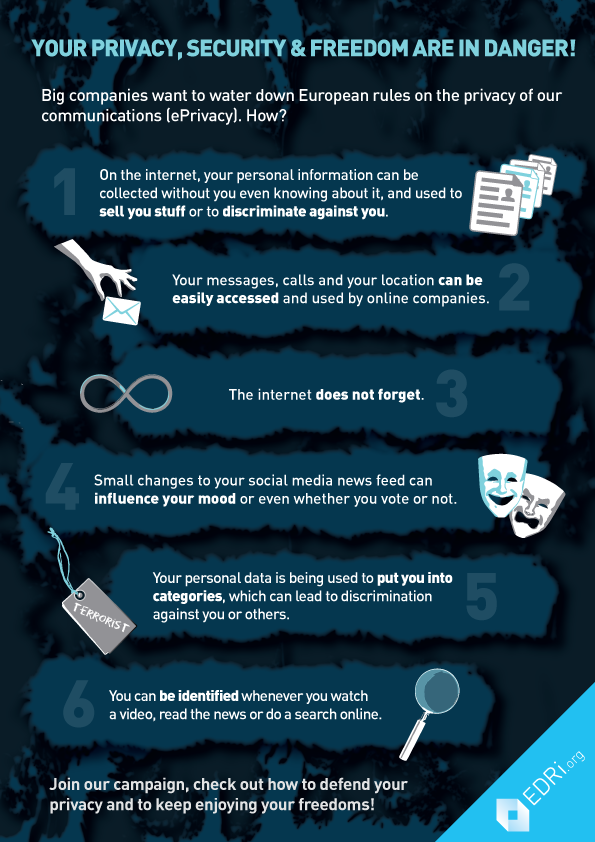
Credit: edri.org
Secure Your Online Presence
Protecting your personal information is crucial today. Cyber threats can harm your privacy. Securing your online presence helps you stay safe.
Privacy Settings On Social Media
Social media platforms collect a lot of information. Adjusting your privacy settings can limit what others see.
- Set your profile to private.
- Control who can send you friend requests.
- Limit the audience for your posts.
Review these settings regularly. Here’s a simple checklist:
- Check who can see your friends list.
- Disable location sharing on posts.
- Turn off tagging by others.
Remember, sharing less is safer. Think before posting personal information.
Safe Online Shopping Practices
Online shopping is convenient but risky. Follow these tips to shop safely:
- Use secure websites (look for HTTPS).
- Check for customer reviews.
- Avoid public Wi-Fi for transactions.
Here’s a table of safe payment methods:
| Payment Method | Safety Level |
|---|---|
| Credit Card | High |
| Debit Card | Medium |
| PayPal | High |
| Bank Transfer | Low |
Always check your bank statements. Report any suspicious activity immediately.
Recognizing And Avoiding Phishing Scams
Phishing scams trick people into giving away personal information. They often appear as emails or messages from trusted sources. Understanding how to recognize and avoid these scams is crucial for online safety.
Identifying Phishing Attempts
Phishing attempts can be sneaky. Here are key signs to look for:
- Generic Greetings: Emails that say “Dear Customer” instead of your name.
- Urgent Language: Messages that claim you must act quickly.
- Suspicious Links: Hover over links to see the real URL. It may look different.
- Strange Email Addresses: Check the sender’s email closely. It may have extra letters or misspellings.
- Attachments: Unexpected attachments can contain malware.
Best Practices For Email Security
Follow these practices to stay safe from phishing scams:
- Use Strong Passwords: Create complex passwords. Mix letters, numbers, and symbols.
- Enable Two-Factor Authentication: This adds an extra layer of security.
- Keep Software Updated: Install updates for your operating system and apps.
- Verify Requests: Always confirm requests for personal info directly with the company.
- Report Phishing: Notify your email provider about phishing attempts.
Using these steps can help keep your personal information safe. Stay al