

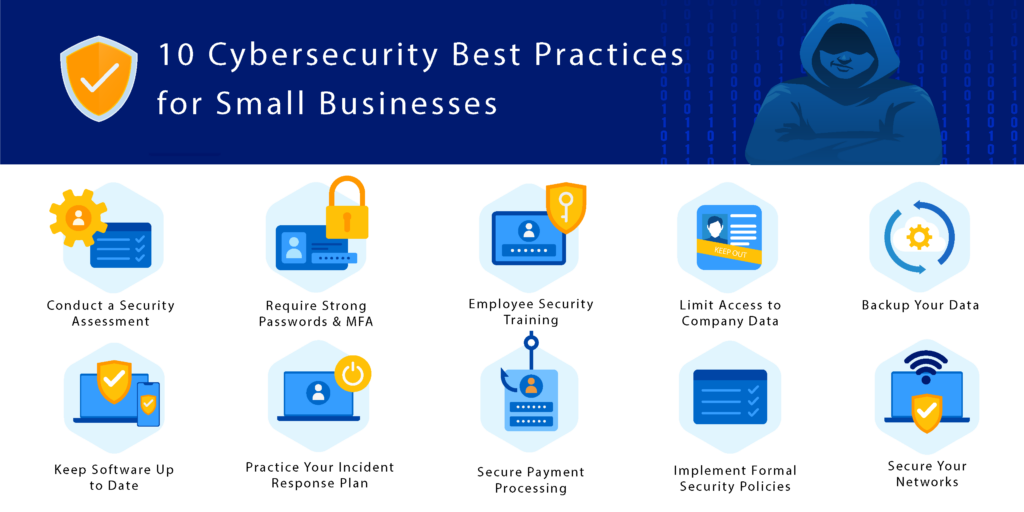
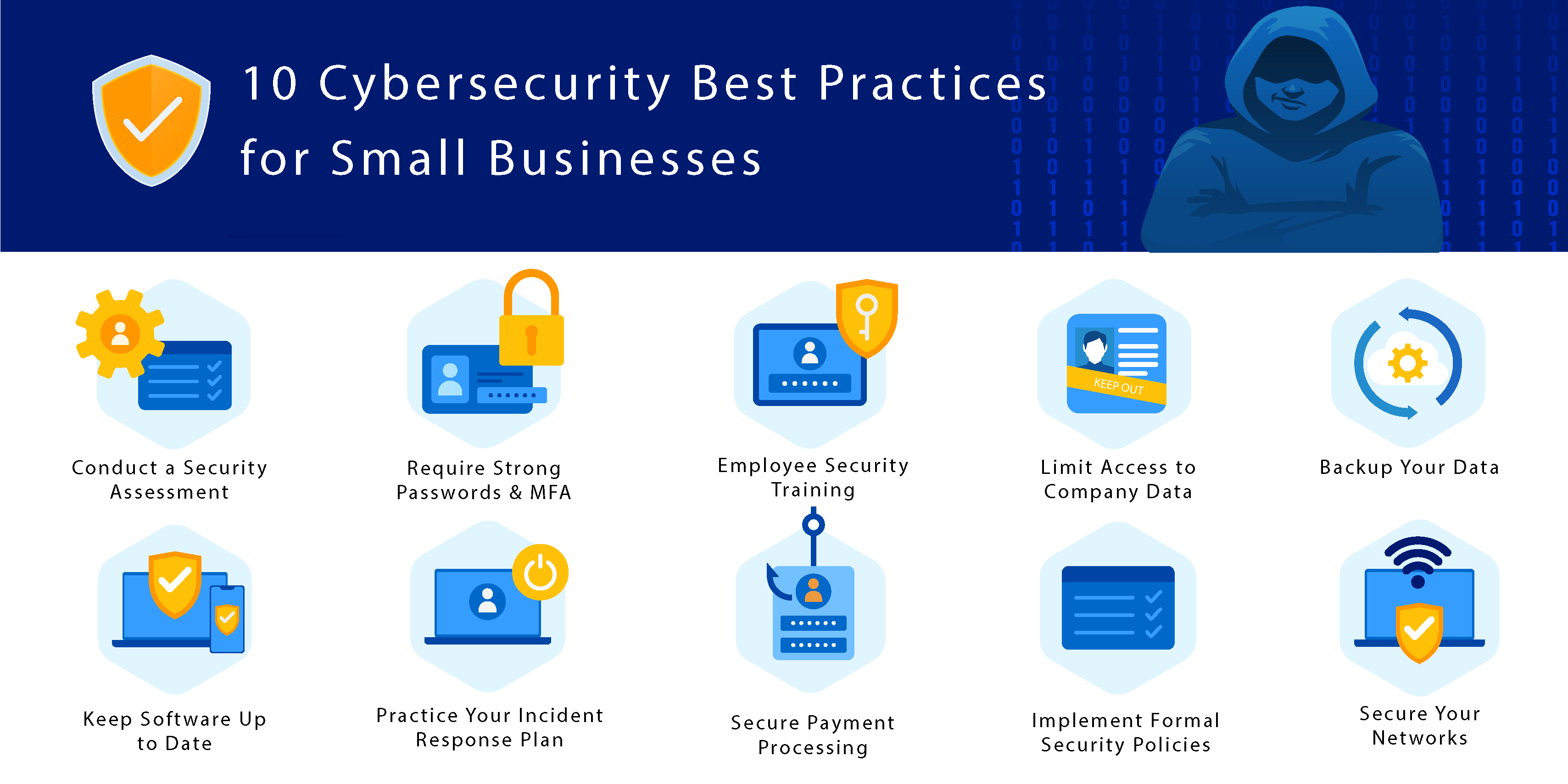
**Best Cybersecurity Practices for Small Businesses:** Implement strong passwords, regular software updates, and employee training to safeguard sensitive information. Small businesses face unique cybersecurity challenges.
Limited resources often make them attractive targets for cybercriminals. Establishing robust cybersecurity practices is essential for protecting valuable data. Start by training employees on recognizing phishing attacks and using strong passwords. Regularly update software and systems to close security gaps.
Back up critical data to avoid loss from ransomware attacks. Consider using multi-factor authentication for an added layer of security. By prioritizing cybersecurity, small businesses can minimize risks and enhance customer trust. Investing in these practices not only protects your business but also contributes to a safer digital environment for everyone.
Credit: www.psmpartners.com
The Cyber Threat Landscape For Small Businesses
The digital world is a dangerous place for small businesses. Cybercriminals target these companies more often. They see small enterprises as easy prey. Many small businesses lack robust security measures. Understanding the threat landscape is crucial.
Small businesses face various cyber threats daily. Knowing the risks helps in protecting valuable data. Awareness can prevent significant losses and damage. Let’s explore common attacks and the costs of neglecting cybersecurity.
Common Cyber Attacks Targeting Small Enterprises
Small businesses encounter many types of cyber attacks. Here are some of the most common:
- Phishing: Fraudulent emails trick employees into sharing information.
- Ransomware: Malicious software locks data until a ransom is paid.
- Data Breaches: Unauthorized access to sensitive information.
- DDoS Attacks: Overloading servers to disrupt services.
- Malware: Software designed to harm systems or steal data.
Each type of attack can have severe consequences. Small businesses must stay alert to these threats.
The Cost Of Neglecting Cybersecurity
Ignoring cybersecurity can lead to devastating costs. Below are some potential financial impacts:
| Type of Cost | Estimated Amount |
|---|---|
| Data Breach Costs | $3.86 million |
| Ransom Payments | $200,000 |
| Legal Fees | $100,000+ |
| Reputation Damage | Varies |
| Downtime Costs | $5,600 per minute |
Small businesses may not recover from these losses. Protecting against cyber threats is essential. Investing in cybersecurity is smart and necessary.
Establishing A Secure Foundation
Creating a strong cybersecurity foundation is vital for small businesses. It protects sensitive data and builds customer trust. A secure setup prevents costly breaches and downtime.
Importance Of A Cybersecurity Policy
A cybersecurity policy is essential for every small business. It sets clear rules for employees. This policy should cover:
- Acceptable use of company devices
- Password management
- Data protection measures
- Incident response procedures
A well-defined policy helps employees understand their roles. It also outlines the consequences of neglecting security measures. Regular training should reinforce this policy.
Setting Up Basic Cyber Hygiene
Basic cyber hygiene practices are easy but effective. Follow these steps to improve security:
- Use Strong Passwords: Create unique passwords for each account.
- Enable Two-Factor Authentication: Add an extra layer of protection.
- Keep Software Updated: Install updates for operating systems and applications.
- Back Up Data: Regular backups protect against data loss.
- Educate Employees: Regular training sessions improve awareness.
These practices create a safer environment for everyone. Regularly review and update these measures to stay protected.
Employee Education And Training
Employee education and training are key to strong cybersecurity. Knowledgeable employees can prevent many security breaches. Regular training keeps staff informed about new threats. This practice creates a culture of security awareness.
Conducting Regular Security Awareness Programs
Security awareness programs help employees understand their role in cybersecurity. These programs should be engaging and informative. Here are some effective methods:
- Interactive workshops
- Online courses
- Regular newsletters
- Guest speakers
Topics to cover include:
- Identifying phishing emails
- Safe internet browsing
- Creating strong passwords
- Reporting suspicious activities
Regular programs keep security top of mind. Schedule these sessions at least once a quarter.
Simulating Phishing Attacks For Preparedness
Simulated phishing attacks help employees recognize real threats. This hands-on approach increases awareness and preparedness. Follow these steps to implement simulations:
- Create realistic phishing emails.
- Send them to employees.
- Track responses and identify who clicked.
- Provide feedback and training for those who fell for it.
Simulations should occur several times a year. They help reinforce training and improve response rates.
Regular training and simulations build a stronger defense. Educated employees are your best asset against cyber threats.
Credit: www.psmpartners.com
Investing In Robust Security Solutions
Small businesses face unique cybersecurity threats. Investing in robust security solutions is essential. These solutions protect sensitive data and ensure smooth operations. A strong security strategy builds customer trust. It also safeguards your business’s reputation.
Choosing The Right Antivirus And Antimalware Software
Choosing the right antivirus and antimalware software is crucial. Here are key factors to consider:
- Real-time Protection: Look for software that scans files as they download.
- Frequent Updates: Ensure the software receives regular updates.
- User-friendly Interface: Choose software that is easy to navigate.
- Customer Support: Reliable support can help during emergencies.
- Compatibility: Ensure it works with your operating system.
Popular antivirus options include:
| Software | Features | Price |
|---|---|---|
| Norton | Real-time protection, VPN, cloud backup | $39.99/year |
| McAfee | Multi-device protection, web protection | $44.99/year |
| Bitdefender | Anti-phishing, VPN, password manager | $29.99/year |
The Role Of Firewalls In Network Protection
Firewalls act as barriers between your network and threats. They monitor incoming and outgoing traffic. A good firewall blocks malicious attacks. Here are types of firewalls to consider:
- Packet Filtering Firewalls: Examines packets and blocks harmful ones.
- Stateful Inspection Firewalls: Tracks active connections and allows safe traffic.
- Next-Generation Firewalls: Combines traditional firewalls with advanced features.
Key benefits of using a firewall:
- Protects sensitive business data
- Prevents unauthorized access
- Monitors network traffic
Investing in firewalls enhances overall security. Make sure to configure them correctly for maximum protection.
Data Protection And Backup Strategies
Data protection is crucial for small businesses. Strong backup strategies help prevent data loss. These strategies guard against cyber threats and accidental deletions. Here are key methods to secure your data.
Implementing Strong Data Encryption
Data encryption transforms readable data into a coded format. Only authorized users can decode it. This protects sensitive information from cybercriminals.
- Use AES (Advanced Encryption Standard): This is a strong encryption method.
- Encrypt sensitive files: Focus on client data and financial records.
- Encrypt data in transit: Use HTTPS for websites and secure emails.
Regularly update encryption keys. This prevents unauthorized access. Train employees on the importance of encryption. Make it a part of your cybersecurity policy.
Regular Data Backups And Recovery Plans
Regular data backups are essential. They help recover information after a data loss incident. A good backup strategy includes:
- Schedule automatic backups: Set daily or weekly backups.
- Use multiple backup locations: Store backups in the cloud and on external drives.
- Test your recovery plan: Ensure data can be restored quickly.
Consider using the 3-2-1 backup rule:
| Backup Type | Details |
|---|---|
| 3 | Keep three copies of your data. |
| 2 | Store data on two different media types. |
| 1 | Keep one copy offsite. |
Implementing these strategies will enhance your data security. Protect your business from potential threats.
Access Control And Authentication
Access control and authentication are vital for small businesses. They protect sensitive data and systems from unauthorized access. Implementing strong access measures reduces the risk of cyberattacks.
Using Multi-factor Authentication
Multi-factor authentication (MFA) adds an extra layer of security. It requires users to provide two or more verification methods. This can include:
- Something you know: A password or PIN.
- Something you have: A phone or security token.
- Something you are: A fingerprint or facial recognition.
MFA makes it harder for hackers to access accounts. Even if a password is stolen, they still need another factor. Implementing MFA is easy and effective.
Managing User Privileges And Password Policies
Managing user privileges is crucial for security. Assign different levels of access based on roles. This limits the information each user can see.
| User Role | Access Level |
|---|---|
| Admin | Full access to all data |
| Employee | Access to necessary files only |
| Guest | Limited access for viewing |
Set strong password policies. Encourage users to create complex passwords. Passwords should include:
- At least 12 characters
- Upper and lower case letters
- Numbers
- Special characters
Regularly update passwords. Educate employees about phishing attacks. Strong access control and password policies enhance security.
Mobile And Remote Work Security
Mobile and remote work security is vital for small businesses. Many employees work outside the office. This increases the risk of cyber threats. Protecting devices and data is crucial.
Securing Mobile Devices And Byod Culture
Securing mobile devices is essential. Here are key practices:
- Use strong passwords. Set complex passwords for devices.
- Enable encryption. Encrypt sensitive data on devices.
- Regular updates. Keep software and apps updated.
- Install security apps. Use antivirus and anti-malware software.
- Educate employees. Train staff on mobile security risks.
The Bring Your Own Device (BYOD) culture can introduce risks. Implement these strategies to manage it:
- Establish a BYOD policy. Clearly define rules for device usage.
- Monitor devices. Regularly check for compliance with policies.
- Remote wipe capability. Allow remote data deletion if a device is lost.
Vpn Usage For Safe Remote Access
A Virtual Private Network (VPN) protects remote access. It creates a secure connection. Use VPNs for the following reasons:
- Encrypt internet traffic. This keeps data safe from hackers.
- Anonymity. VPNs hide your IP address.
- Access blocked content. Bypass restrictions easily.
Choose a reliable VPN provider. Look for:
| Feature | Importance |
|---|---|
| Strong encryption | Protects sensitive data. |
| No-log policy | Ensures user privacy. |
| Speed | Maintains work efficiency. |
Implementing a VPN enhances security for remote work. Protect your business and employees with these measures.
Credit: www.bizstim.com
Staying Ahead With Regular Audits And Updates
Regular audits and updates help small businesses stay secure. Cyber threats evolve quickly. Businesses must adapt to keep their data safe. This section covers two essential practices: conducting periodic audits and updating software.
Conducting Periodic Security Audits
Periodic security audits help identify vulnerabilities. They provide insights into potential risks. Follow these steps for effective audits:
- Schedule Regular Audits: Set a specific time for audits. Monthly or quarterly schedules work well.
- Assess Current Security Measures: Review firewalls, antivirus software, and password policies.
- Engage Third-party Experts: Consider hiring cybersecurity professionals for unbiased evaluations.
- Document Findings: Keep records of vulnerabilities and solutions. This helps track progress.
- Implement Changes: Fix identified issues immediately. Prioritize critical vulnerabilities first.
Regular audits boost security. They help businesses find and fix problems before they become serious threats.
Keeping Software And Systems Up-to-date
Outdated software poses a significant risk. Cybercriminals exploit known vulnerabilities in old systems. Maintain up-to-date software with these practices:
- Enable Automatic Updates: Turn on automatic updates for all software.
- Regularly Check for Updates: Manually check for updates at least once a month.
- Use Supported Software: Avoid using unsupported or outdated software. This increases risk.
- Educate Employees: Train staff on the importance of updates. Awareness helps protect the business.
Keeping software updated is vital. It protects against vulnerabilities and enhances overall security.
Creating An Incident Response Plan
An incident response plan is crucial for small businesses. It prepares your team for potential cyber threats. A well-structured plan helps minimize damage and recover faster. Here, we will discuss key elements for creating an effective incident response plan.
Developing A Response Strategy For Security Breaches
Creating a response strategy involves several steps:
- Identify Critical Assets: Know what data and systems are vital.
- Assess Risks: Determine potential threats to your business.
- Define Roles: Assign tasks to team members during an incident.
- Establish Communication Channels: Set up ways to inform stakeholders.
- Document Procedures: Write down steps for each type of incident.
Regularly review and update this strategy. Cyber threats evolve quickly. Keeping your plan current is essential.
Training Staff On Incident Response Procedures
Training is vital for effective incident response. Ensure all staff members understand their roles. Here are key training components:
- Conduct Regular Drills: Simulate incidents to practice response.
- Provide Clear Guidelines: Offer easy-to-follow instructions.
- Encourage Reporting: Create a culture of openness about security issues.
- Update Training Regularly: Incorporate new threats into training.
Consider using a table for tracking training progress:
| Staff Member | Training Date | Next Training Due | Status |
|---|---|---|---|
| John Doe | 01/15/2023 | 07/15/2023 | Completed |
| Jane Smith | 02/20/2023 | 08/20/2023 | In Progress |
Empower your staff to act quickly. A well-trained team can significantly reduce damage during a breach.
Legal Compliance And Industry Standards
Small businesses must understand the importance of legal compliance. Meeting regulatory requirements protects sensitive data. It also builds customer trust. Adopting industry standards enhances security measures. Here’s how to navigate legal regulations and industry-specific requirements.
Understanding Gdpr, Ccpa, And Other Regulations
Regulations like GDPR and CCPA focus on data protection. Knowing these laws is vital for small businesses.
| Regulation | Key Focus | Applicable Regions |
|---|---|---|
| GDPR | Data protection and privacy | European Union |
| CCPA | Consumer privacy rights | California, USA |
| HIPAA | Healthcare data privacy | USA |
| PIPEDA | Data privacy in commercial activities | Canada |
Small businesses should:
- Review data collection practices.
- Implement privacy notices for customers.
- Train staff on data handling.
Adhering To Industry-specific Security Standards
Each industry has unique security standards. Compliance reduces risks. It also ensures better data protection.
- PCI-DSS for payment card data.
- NIST for federal information systems.
- ISO 27001 for information security management.
Follow these steps for compliance:
- Identify applicable standards for your industry.
- Conduct a security assessment.
- Implement necessary changes to meet standards.
- Regularly audit your security measures.
Staying compliant not only protects your business. It also safeguards your customers’ information. Invest time and resources in understanding these regulations.
Frequently Asked Questions
What Are Essential Cybersecurity Practices For Small Businesses?
Small businesses should implement strong password policies, use two-factor authentication, and regularly update software. Employee training is crucial for recognizing phishing attempts. Regularly backing up data and using firewalls can significantly enhance security. These practices create a robust defense against cyber threats.
How Can Small Businesses Prevent Data Breaches?
To prevent data breaches, small businesses must secure sensitive information using encryption. Regularly update security software and conduct vulnerability assessments. Employee education on security protocols is vital. Additionally, implementing access controls limits who can view sensitive data, reducing risks significantly.
Why Is Employee Training Important In Cybersecurity?
Employee training is essential because humans are often the weakest link in cybersecurity. Proper training helps staff recognize threats like phishing and social engineering. Educated employees can respond appropriately, reducing the likelihood of breaches. Regular training updates keep staff informed about evolving cyber threats.
What Is Two-factor Authentication And Why Use It?
Two-factor authentication (2FA) adds an extra layer of security. It requires two forms of identification before granting access. This reduces the risk of unauthorized access, even if passwords are compromised. Implementing 2FA is a simple yet effective way for small businesses to enhance cybersecurity.
Conclusion
Implementing strong cybersecurity practices is crucial for small businesses. Regular training for employees can prevent many threats. Investing in reliable software and routine updates enhances protection. Regularly backing up data ensures recovery from incidents. By prioritizing cybersecurity, small businesses can safeguard their assets and build trust with clients.
Stay vigilant and proactive.


Leave a Reply