
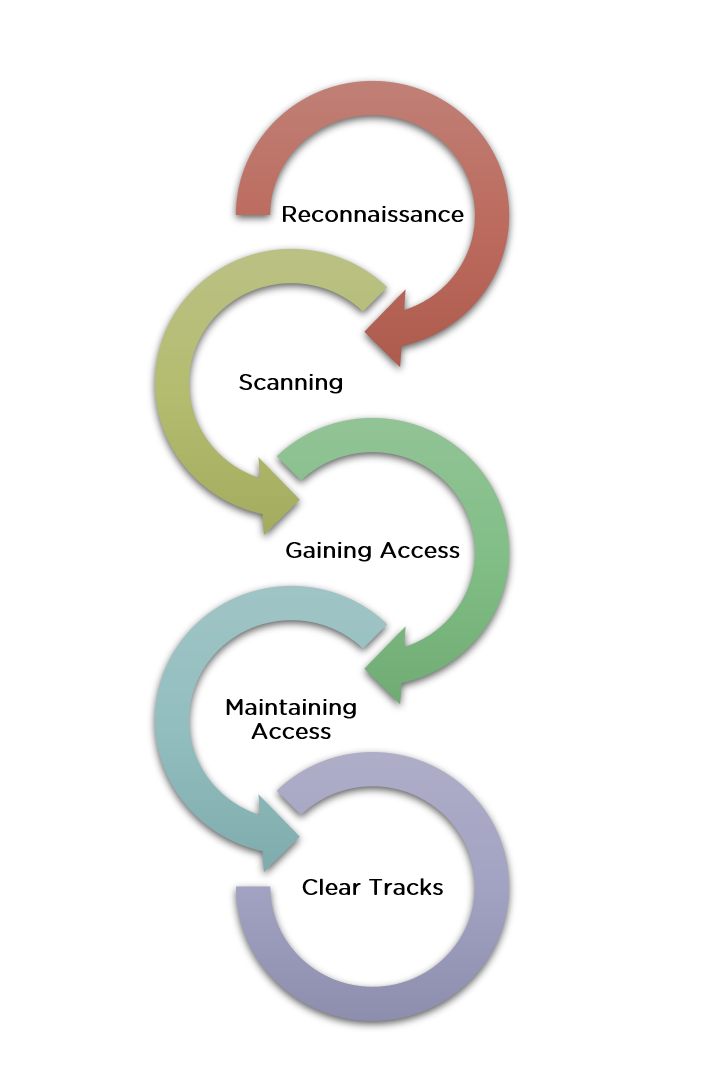
To use Nmap for ethical hacking, install Nmap and run scans to identify open ports and services on a target. Analyze the scan results to assess potential vulnerabilities.
How to Use Nmap for Ethical Hacking:Nmap, short for Network Mapper, is a powerful tool used in ethical hacking for network discovery and security auditing. It is open-source and widely recognized for its efficiency in scanning large networks. Ethical hackers use Nmap to identify open ports, running services, and potential vulnerabilities in target systems.
By conducting detailed scans, they can gather critical information to enhance network security. Nmap’s versatility and robust features make it an essential tool for cybersecurity professionals. Understanding how to use Nmap effectively can significantly improve your ability to protect and secure digital environments against malicious threats.

Credit: www.udemy.com
Introduction To Nmap
Nmap is a powerful tool for network scanning. Ethical hackers use it to discover network vulnerabilities. It helps in securing systems by identifying weaknesses.
What Is Nmap?
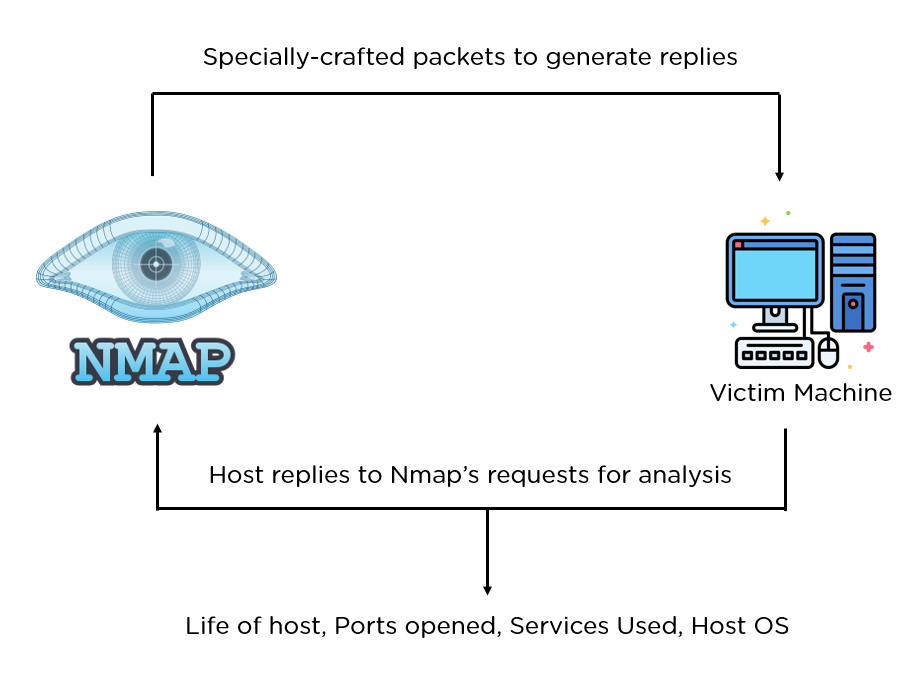
Nmap stands for Network Mapper. It is an open-source tool. The primary use is to discover hosts and services on a computer network. It does this by sending packets and analyzing the responses.
Nmap can:
- Identify live hosts on a network
- Discover open ports
- Detect software and version
- Identify operating systems
- Detect security risks
Ethical hackers use these features to secure systems. It helps them understand the network structure and find vulnerabilities.
Importance In Ethical Hacking
Nmap is essential in ethical hacking. It helps in the initial stages of penetration testing. This stage is called reconnaissance or information gathering.
Benefits of using Nmap in ethical hacking:
- Efficiency: Nmap scans networks quickly.
- Accuracy: It provides precise results.
- Versatility: Nmap works on various operating systems.
- Customization: Users can script scans for specific needs.
Nmap also supports various scan types. This includes TCP scans, UDP scans, and stealth scans. These features make it a versatile tool for ethical hackers.
Basic Nmap Commands
Here are some basic Nmap commands:
| Command | Description |
|---|---|
nmap -sP [target] |
Ping scan to find live hosts. |
nmap -sS [target] |
SYN scan to find open ports. |
nmap -O [target] |
Operating system detection. |
nmap -A [target] |
Advanced scan with OS and version detection. |
These commands help ethical hackers gather crucial information. They can then use this information to secure the network.

Credit: www.youtube.com
Setting Up Nmap
Nmap is a powerful tool for ethical hacking. Setting it up correctly is crucial for effective use. This section will guide you through the installation process and basic configuration. Follow the steps below to get started.
Installation Process
Installing Nmap is straightforward. Follow these steps for your operating system.
Windows
- Visit the official Nmap download page.
- Download the Nmap Windows Installer.
- Run the installer and follow the on-screen instructions.
- Open the Command Prompt and type
nmapto verify the installation.
Linux
Open the terminal and run the following commands based on your distribution:
- Debian/Ubuntu:
sudo apt-get install nmap - CentOS/RHEL:
sudo yum install nmap - Fedora:
sudo dnf install nmap
To verify the installation, type nmap in the terminal.
MacOS
- Install Homebrew if you haven’t already.
- Open the terminal and run
brew install nmap. - Type
nmapin the terminal to verify the installation.
Basic Configuration
After installing Nmap, configuring it is the next step. Follow these tips for basic configuration.
- Ensure you have root privileges for advanced scanning options.
- Check your network settings to avoid conflicts.
- Use the
nmap --helpcommand to explore basic options.
Here’s a simple command to get you started:
nmap -sP 192.168.1.1/24This command scans all devices in the 192.168.1.1 network. It helps you understand the basic functionality of Nmap.
Understanding Nmap Commands
Nmap is a powerful tool for network scanning and security auditing. Knowing Nmap commands is crucial for ethical hacking. This section will teach you the basic and advanced Nmap commands.
Common Commands
Here are some common Nmap commands you will use often:
| Command | Description |
|---|---|
nmap -sP [target] |
Ping scan to check if hosts are up. |
nmap -sS [target] |
TCP SYN scan, the most common scan option. |
nmap -O [target] |
Detect the operating system of the target. |
nmap -sV [target] |
Version detection to find software versions. |
Advanced Options
For more detailed scans, use these advanced Nmap options:
nmap --script [script] [target]– Use Nmap scripts for advanced scanning.nmap -A [target]– Aggressive scan to gather more information.nmap -Pn [target]– Scan a target without pinging it first.nmap -p [port] [target]– Scan specific ports on the target.
Using these commands will give you a better understanding of your network. Always use Nmap responsibly and ethically.
Scanning Techniques
Nmap is a powerful tool for ethical hacking. It uses various scanning techniques to identify vulnerabilities. This section explains two common methods: TCP Connect Scan and SYN Scan.
Tcp Connect Scan
The TCP Connect Scan is a straightforward method. It completes the three-way handshake to connect to a target.
Here is a basic command for a TCP Connect Scan:
nmap -sT [target]This scan is easy to detect. It fully opens and closes a connection.
- Advantages: Simple and reliable.
- Disadvantages: Easily detected by firewalls.
Syn Scan
The SYN Scan is also known as a half-open scan. It sends a SYN packet to the target and waits for a response.
Here is a basic command for a SYN Scan:
nmap -sS [target]This scan is stealthier. It does not complete the full handshake.
- Advantages: Harder to detect.
- Disadvantages: Requires special permissions.
Both scanning techniques are vital for ethical hackers. They help identify open ports and potential vulnerabilities. Choose the one that fits your needs and start scanning safely.
Discovering Hosts
Discovering hosts is the first step in ethical hacking with Nmap. This process helps identify active devices on a network. By using Nmap, you can determine which hosts are up and running. This knowledge is vital for further network exploration and security assessment.
Ping Scan
A Ping Scan helps identify live hosts by sending ICMP echo requests. If a host responds, it is considered active. This method is quick and efficient.
nmap -sn 192.168.1.0/24In this command, -sn stands for “ping scan”. The IP range 192.168.1.0/24 scans the entire subnet. It lists all active hosts without port scanning.
- Quickly identifies active hosts
- Less intrusive compared to full scans
- Useful for large networks
Arp Scan
An ARP Scan is more accurate for local networks. It uses Address Resolution Protocol to discover hosts. This method is effective even if ICMP is blocked.
sudo nmap -PR 192.168.1.0/24The -PR option specifies ARP Scan. The command needs sudo because ARP requests require root privileges.
- Highly accurate on local networks
- Bypasses ICMP restrictions
- Quick and efficient
Key Differences Between Ping Scan and ARP Scan:
| Ping Scan | ARP Scan |
|---|---|
| Uses ICMP echo requests | Uses Address Resolution Protocol |
| Less accurate if ICMP is blocked | Effective on local networks |
| No root privileges needed | Requires root privileges |
Credit: www.simplilearn.com
Service And Version Detection
Nmap is a powerful tool for ethical hacking. It helps identify services running on a target system. One of its key features is Service and Version Detection. This feature allows you to discover which services are running and their specific versions. This information is crucial for ethical hackers to identify potential vulnerabilities.
Service Scan
The Service Scan feature in Nmap identifies open ports. It then determines which services are running on those ports. This scan is vital for understanding the target system’s architecture. To perform a service scan, use the command:
nmap -sV [target]The -sV flag tells Nmap to perform a service scan. The output will list all detected services and their respective ports.
Below is an example of how the output might look:
| Port | Service |
|---|---|
| 80 | HTTP |
| 443 | HTTPS |
| 22 | SSH |
Version Detection
Version Detection goes a step further. It identifies the specific versions of the services running. This is crucial for pinpointing vulnerabilities in outdated software. To perform a version detection scan, use:
nmap -sV --version-intensity 5 [target]The --version-intensity flag controls the depth of the scan. A higher value means more aggressive scanning. The output will look like this:
| Port | Service | Version |
|---|---|---|
| 80 | HTTP | Apache 2.4.41 |
| 443 | HTTPS | nginx 1.18.0 |
| 22 | SSH | OpenSSH 7.9 |
With this information, ethical hackers can identify weaknesses. They can then recommend updates or patches to secure the system.
Os Detection
Operating System (OS) detection is a vital part of ethical hacking. It identifies the OS running on a target system. Knowing the OS helps in finding vulnerabilities. Nmap is a powerful tool for OS detection.
How Os Detection Works
Nmap uses various techniques to detect an OS. It sends specially crafted packets to the target system. The system’s responses reveal its OS. Nmap compares these responses with its database. This database contains known OS fingerprints.
Here is a simplified process:
- Nmap sends TCP, UDP, and ICMP packets.
- The target system responds to these packets.
- Nmap analyzes the responses.
- It matches the responses with its OS database.
Nmap’s OS detection is reliable. It can identify many OS versions.
Practical Examples
Using Nmap for OS detection is straightforward. Here are some practical examples:
- Open your terminal or command prompt.
- Type the following command:
nmap -O [target IP]This command enables OS detection. Replace [target IP] with the actual IP address. For example:
nmap -O 192.168.1.1Nmap will scan the IP address. It will try to detect the OS. The results will show the detected OS and version.
Here’s another example using a target hostname:
nmap -O example.comNmap will resolve the hostname to an IP address. It will then perform OS detection.
For more detailed output, use the -v flag:
nmap -O -v [target IP]This command provides verbose output. It gives more information about the scanning process.
These examples show how easy it is to use Nmap. OS detection helps ethical hackers identify potential vulnerabilities.
Using Nmap Scripts
Nmap is a powerful tool for ethical hacking. One of its key features is the Nmap Scripting Engine (NSE). These scripts extend Nmap’s capabilities, making it possible to perform more detailed scans. In this section, we will explore how to use Nmap scripts effectively.
Introduction To Nse
The Nmap Scripting Engine (NSE) allows users to write and share scripts. These scripts perform various network tasks. NSE scripts can automate many activities, from simple scans to complex network audits.
Scripts are written in the Lua programming language. They can be categorized based on their purpose:
- Discovery: Find hosts and services.
- Vulnerability: Check for known vulnerabilities.
- Exploitation: Exploit vulnerabilities.
- Backdoor: Detect backdoors.
- Malware: Detect malware.
To use an NSE script, you can run a command like:
nmap --script script-name targetPopular Scripts
There are many popular NSE scripts. Here are some that are widely used:
| Script Name | Description |
|---|---|
| http-enum | Enumerates directories on web servers. |
| ftp-anon | Checks for anonymous FTP access. |
| smtp-open-relay | Checks if the SMTP server is an open relay. |
| dns-zone-transfer | Attempts a zone transfer. |
Using these scripts can provide valuable information. They help ethical hackers understand the security posture of a network. Run these scripts with caution and proper authorization.
To run multiple scripts, use the following command:
nmap --script script1,script2 targetUsing Nmap scripts can greatly enhance your ethical hacking efforts. They offer a powerful way to automate and extend your scans.
Analyzing Nmap Output
Nmap is a powerful tool in ethical hacking. It helps you discover network details. Understanding Nmap’s output is essential. This section will guide you through the process.
Reading The Results
Once you run an Nmap scan, you receive detailed results. Each line contains valuable information.
- Host: This shows the target’s IP address or hostname.
- State: Indicates if a port is open, closed, or filtered.
- Service: Displays the common name of the service running on the port.
- Version: Shows the version of the service, if detected.
Understanding each part helps you assess the network’s security.
Exporting Data
Nmap allows exporting scan results for further analysis. This is useful for detailed reports.
- Use the
-oNoption to export in normal format. - Use the
-oXoption for XML format. - Use the
-oGoption for grepable format.
Here is an example command:
nmap -oX output.xml scanme.nmap.orgThis command saves the output in XML format. You can open this file later for review.
| Format | Command Option |
|---|---|
| Normal | -oN |
| XML | -oX |
| Grepable | -oG |
Exporting data helps you analyze results later. It also assists in creating documentation.
Best Practices And Tips
Using Nmap for ethical hacking requires skill and attention. By following best practices, you can make the most out of your Nmap scans. Here are some tips to help you perform efficient and stealthy scans.
Efficient Scanning
Efficiency is key when using Nmap. Use these tips to save time:
- Use specific targets: Scan IP ranges, not entire networks.
- Run as root: Some scans need root access for complete results.
- Limit port ranges: Scan only necessary ports to save time.
- Use version detection: Add
-sVto your scans to find service versions.
| Command | Description |
|---|---|
nmap -sP 192.168.1.1/24 |
Ping scan a range of IPs |
nmap -A 192.168.1.1 |
Perform an aggressive scan |
nmap -p 80,443 192.168.1.1 |
Scan specific ports |
Avoiding Detection
Stealth is important for ethical hacking. Follow these tips to avoid detection:
- Use decoys: Add
-Dto your command to confuse IDS. - Scan slowly: Use
-T0to slow down your scans. - Spoof IP: Use
-Sto spoof your IP address. - Randomize targets: Use
--randomize-hoststo avoid patterns.
Here’s an example command for a stealthy scan:
nmap -D RND:10 -T0 -S 192.168.1.100 --randomize-hosts 192.168.1.1This command uses decoys, slows down the scan, spoofs the IP, and randomizes targets.
Frequently Asked Questions
What Is Nmap Used For In Ethical Hacking?
Nmap is a network scanning tool. It helps identify devices on a network. Ethical hackers use it to find vulnerabilities. It provides details like open ports and services.
How Do I Install Nmap On Windows?
Download the installer from the Nmap website. Run the installer and follow the prompts. After installation, open the command prompt. Type “nmap” to verify the installation.
Can Nmap Detect Open Ports?
Yes, Nmap can detect open ports. It scans network devices to find open ports. This helps identify potential security risks. Ethical hackers use this information for vulnerability assessment.
Is Nmap Free To Use?
Yes, Nmap is free and open-source. You can download it from the official website. It’s widely used by security professionals. Its source code is available for modification.
Conclusion
Mastering Nmap for ethical hacking can enhance your cybersecurity skills. It helps identify network vulnerabilities efficiently. Practice regularly to stay updated with new features. Ethical use of Nmap ensures you contribute positively to cybersecurity. Start your journey today and protect digital landscapes effectively.


Leave a Reply