

Network penetration testing involves simulating cyber attacks to identify vulnerabilities in a system. This step-by-step guide outlines methods to enhance network security effectively.
Step-By-Step Guide to Network Penetration Testing:Penetration testing is crucial for safeguarding sensitive data and maintaining system integrity. Organizations face increasing threats from cybercriminals, making proactive security measures essential. This guide simplifies the process, enabling both novice and experienced professionals to navigate network penetration testing. Each step is designed to ensure a thorough assessment of vulnerabilities.
By following this structured approach, teams can pinpoint weaknesses and bolster defenses. The importance of regular testing cannot be overstated, as it helps organizations stay one step ahead of potential attacks. Embracing these practices fosters a culture of security awareness and resilience within the organization.
Introduction To Network Penetration Testing
Network penetration testing, or pen testing, finds vulnerabilities in computer networks. It simulates a real attack to assess security. This process helps organizations protect their data and resources. Understanding pen testing is crucial for network security.
The Importance Of Pen Testing
Pen testing is vital for several reasons:
- Identify Vulnerabilities: Discover weak spots before attackers do.
- Improve Security Measures: Strengthen defenses based on findings.
- Compliance: Meet legal and regulatory requirements.
- Build Trust: Assure customers their data is safe.
Goals And Scope Of Network Security
The main goals of network security include:
- Protect Data: Safeguard sensitive information from unauthorized access.
- Ensure Availability: Keep systems running smoothly without downtime.
- Maintain Integrity: Ensure data is accurate and unaltered.
The scope of network security covers:
| Scope Area | Description |
|---|---|
| Firewalls | Block unauthorized access to the network. |
| Intrusion Detection Systems | Monitor network traffic for suspicious activity. |
| Encryption | Protect data by encoding it. |
Understanding these goals and scope areas helps in effective pen testing. This knowledge leads to better security strategies and risk management.

Credit: blog.rsisecurity.com
Essential Tools For Pen Testers
Network penetration testing requires the right tools. These tools help find and fix security issues. They can be software or hardware. Choosing the right tools is key for effective testing.
Software And Hardware Requirements
Pen testers need specific software and hardware tools. Here are some essential ones:
- Operating System: Linux is the preferred choice.
- Virtual Machines: Use VMware or VirtualBox.
- Network Analyzers: Wireshark is popular.
- Vulnerability Scanners: Nessus and OpenVAS are effective.
- Exploitation Frameworks: Metasploit is widely used.
Hardware tools are also important:
- Wireless Adapters: Alfa AWUS036NHA is recommended.
- Network Taps: These help monitor traffic.
- Portable Devices: Raspberry Pi can run pen test tools.
Open Source Vs. Commercial Tools
Choosing between open source and commercial tools is crucial. Each has its pros and cons:
| Type | Pros | Cons |
|---|---|---|
| Open Source |
|
|
| Commercial |
|
|
Evaluate your needs. Select the tools that fit your testing goals.
Setting Up A Testing Environment
Creating a secure testing environment is crucial for effective network penetration testing. A safe lab ensures no damage occurs to live systems. This section focuses on two main areas: creating a safe lab and using virtual machines and test networks.
Creating A Safe Lab
A safe lab isolates testing activities from production systems. It protects sensitive data and prevents accidental breaches. Here are some steps to set up your lab:
- Choose a physical location.
- Use dedicated hardware or virtual machines.
- Install security tools.
- Set up firewalls to control access.
- Regularly update software and systems.
Consider using a sandbox environment. This minimizes risks while testing. Always document your configurations. This helps in troubleshooting and replication.
Virtual Machines And Test Networks
Virtual machines (VMs) allow for flexible testing setups. They can simulate various operating systems and network environments. Use software like VirtualBox or VMware for effective VM management.
| VM Software | Features |
|---|---|
| VirtualBox | Free, open-source, cross-platform |
| VMware | Advanced features, paid options |
Create isolated test networks. This prevents interference with your main network. Use VLANs to segment traffic. This allows for focused testing.
Ensure your testing environment mimics real-world scenarios. This provides accurate results. Test configurations should be documented for future reference.
Information Gathering
Information gathering is a crucial step in network penetration testing. It helps security professionals identify potential vulnerabilities. Proper information collection sets the stage for successful testing. This phase can be divided into two main categories: passive reconnaissance and active reconnaissance.
Passive Reconnaissance
Passive reconnaissance involves collecting information without directly interacting with the target network. This method reduces the chances of detection. Here are some effective techniques:
- Social Media Mining: Analyze social media profiles for valuable data.
- WHOIS Lookup: Gather domain registration details.
- DNS Interrogation: Use tools to find DNS records.
- Search Engine Queries: Utilize search engines to uncover exposed information.
These techniques help build a profile of the target. They provide insights into the network structure and potential vulnerabilities.
Active Reconnaissance Techniques
Active reconnaissance involves direct interaction with the target network. This method gathers more detailed information. Here are some common techniques:
- Network Scanning: Use tools like Nmap to identify live hosts.
- Port Scanning: Check open ports on target systems.
- Service Enumeration: Identify services running on open ports.
- Vulnerability Scanning: Use tools to find known vulnerabilities.
Active techniques provide a clearer picture of the network. They reveal weaknesses that attackers might exploit.
| Technique | Description |
|---|---|
| Network Scanning | Identifies live hosts and devices in the network. |
| Port Scanning | Finds open ports on a target device. |
| Service Enumeration | Discovers services running on open ports. |
| Vulnerability Scanning | Detects known vulnerabilities in systems. |
Using both passive and active reconnaissance enhances testing effectiveness. This phase lays a solid foundation for further penetration testing activities.
Vulnerability Assessment
Vulnerability assessment is a crucial step in network penetration testing. It helps identify weaknesses in your network. This process reveals security gaps that could be exploited by attackers. Understanding these vulnerabilities allows organizations to strengthen their defenses.
Identifying Weaknesses
Identifying weaknesses involves several steps:
- Asset Inventory: List all devices on the network.
- Configuration Review: Check device settings for security flaws.
- Patch Management: Ensure all software is up to date.
- Access Control: Review user permissions and roles.
Regular checks help spot new vulnerabilities. Use a systematic approach to ensure thoroughness.
Using Automated Scanning Tools
Automated scanning tools make vulnerability assessment easier. Here are some popular tools:
| Tool Name | Purpose |
|---|---|
| Nessus | Comprehensive vulnerability scanning |
| OpenVAS | Open-source vulnerability assessment |
| Qualys | Cloud-based security and compliance |
These tools can quickly scan your network. They identify vulnerabilities based on known threats. Follow these steps for effective scanning:
- Configure the tool for your network.
- Run the scan during non-peak hours.
- Review the scan results carefully.
Automated tools enhance efficiency. They help pinpoint issues that need immediate attention.
Exploitation Strategies
Exploitation strategies are crucial in network penetration testing. They involve methods to breach systems and obtain unauthorized access. This section covers two main strategies: crafting the attack vector and gaining access while escalating privileges.
Crafting The Attack Vector
Crafting an attack vector is the first step in exploitation. An attack vector is a path used to exploit a vulnerability. Here are some common types:
- Phishing: Deceptive emails trick users into revealing credentials.
- Malware: Malicious software infects a target system.
- Social Engineering: Manipulating individuals to gain sensitive information.
- SQL Injection: Inserting malicious SQL code into a query.
Choosing the right attack vector depends on the target. Consider the following:
| Attack Type | Target | Effectiveness |
|---|---|---|
| Phishing | Employees | High |
| Malware | Systems | Medium |
| Social Engineering | Users | High |
| SQL Injection | Databases | Very High |
Gaining Access And Escalating Privileges
After crafting the attack vector, gaining access is next. This step involves exploiting vulnerabilities to break into the system.
- Exploit Vulnerabilities: Use tools like Metasploit to find weaknesses.
- Bypass Firewalls: Use techniques to evade detection.
- Access Credentials: Harvest usernames and passwords.
Once inside, escalating privileges is critical. This allows attackers to gain full control. Here are common methods:
- Password Cracking: Use tools to guess or crack passwords.
- Exploiting Misconfigurations: Take advantage of poorly set permissions.
- Using Existing Accounts: Leverage accounts with higher privileges.
Understanding these strategies is vital for effective penetration testing. They provide a roadmap to identify and fix vulnerabilities.
Post-exploitation And Analysis
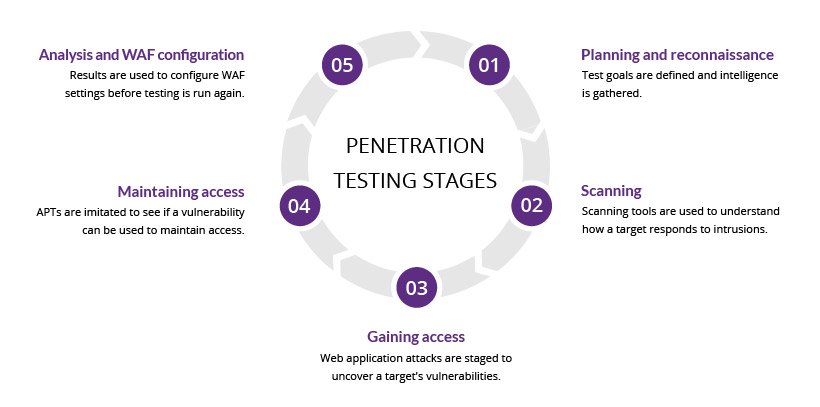
Post-exploitation is crucial in network penetration testing. It involves actions taken after gaining access. This phase helps in understanding the network better. Analysts can find sensitive data and assess damage. Here, we discuss key actions: maintaining access and covering tracks.
Maintaining Access
Maintaining access ensures you can return to the system later. This step is vital for further exploration. Here are some common methods:
- Backdoors: Create hidden entry points for future access.
- Persistent Scripts: Use scripts that run on system startup.
- Password Harvesting: Collect user credentials for re-entry.
Choose methods wisely. Each method has risks and benefits. Always document what you do. This helps in the analysis phase.
Covering Tracks And Cleanup
Covering tracks is essential to avoid detection. Attackers often remove evidence of their presence. Here are effective strategies:
- Log Deletion: Erase logs that show unauthorized access.
- File Modification: Change timestamps to hide activity.
- Network Traffic Cleanup: Remove traces of unusual traffic.
Cleanup is equally important. Ensure all tools and scripts are removed. This prevents future detection of the attack.
| Action | Purpose |
|---|---|
| Backdoors | Ensure future access to the system. |
| Log Deletion | Avoid detection by erasing evidence. |
| Password Harvesting | Collect credentials for easy access. |
Careful execution of these steps leads to successful analysis. Each move provides insights into the network’s weaknesses.
Credit: www.imperva.com
Reporting And Communication
Effective reporting and communication are essential in network penetration testing. Clear reports help stakeholders understand risks and vulnerabilities. Proper communication ensures that everyone is on the same page.
Documenting Findings
Documenting findings is crucial for transparency. Use a structured format for clear understanding. Include the following:
- Executive Summary: Overview of key findings.
- Scope: Define the systems tested.
- Methodology: Explain the testing approach.
- Findings: List vulnerabilities with details.
- Recommendations: Suggest fixes for vulnerabilities.
Use visuals to enhance understanding. Screenshots, graphs, and tables can clarify complex data.
Effective Reporting Techniques
Use these techniques for effective reporting:
- Clarity: Use simple language. Avoid technical jargon.
- Conciseness: Keep reports short. Focus on key points.
- Structure: Use headings and bullet points for easy navigation.
- Visuals: Include charts and diagrams for better insight.
- Follow-up: Schedule follow-up meetings to discuss findings.
Consider using tables for complex data. Here’s an example:
| Vulnerability | Risk Level | Recommendation |
|---|---|---|
| SQL Injection | High | Use parameterized queries. |
| Weak Passwords | Medium | Implement strong password policies. |
| Unpatched Software | High | Regularly update software. |
Effective reporting builds trust. It helps organizations prioritize security measures. Clear communication fosters a proactive security culture.
Legal And Ethical Considerations
Network penetration testing involves critical legal and ethical issues. Understanding these factors is essential for any security professional. Respecting laws and ethics ensures safe practices while testing systems.
Understanding Consent
Consent is a fundamental aspect of penetration testing. Always obtain written permission before testing any network. This protects both the tester and the organization. Here are key points about consent:
- Consent must be clear and specific.
- Document all agreements in writing.
- Ensure all stakeholders understand the testing scope.
Without consent, penetration testing can lead to legal repercussions. Always prioritize transparency and communication with clients.
Compliance And Regulatory Issues
Various laws govern penetration testing. Compliance with these regulations is mandatory. Different industries may have specific rules. Here are some common regulations:
| Regulation | Description |
|---|---|
| GDPR | Protects personal data in the EU. |
| HIPAA | Regulates health information privacy in the US. |
| PCI DSS | Secures credit card transactions globally. |
Understanding these regulations is vital for legal testing. Non-compliance can result in hefty fines and reputational damage. Always keep up with industry standards.
Continuous Improvement And Retesting
Continuous improvement and retesting are vital in network penetration testing. They ensure your network remains secure against evolving threats. Regular assessments help identify new vulnerabilities and mitigate risks.
Learning From Pen Tests
Each penetration test provides valuable insights. Teams learn from the findings to improve security measures. Here are key points to focus on:
- Identify Weaknesses: Understand vulnerabilities in your network.
- Review Methodologies: Analyze the tactics used during testing.
- Implement Changes: Apply the lessons learned effectively.
- Educate Staff: Train employees on security practices.
Scheduling Regular Assessments
Regular assessments are essential for ongoing security. Schedule these tests periodically to stay ahead of threats. Consider the following approaches:
- Quarterly Tests: Conduct tests every three months.
- After Major Changes: Test after system upgrades or changes.
- Before Compliance Audits: Ensure readiness for audits.
Establish a routine to keep your network secure. Use a simple table to track test schedules:
| Test Type | Frequency | Last Conducted | Next Scheduled |
|---|---|---|---|
| Quarterly Pen Test | Every 3 Months | January 2023 | April 2023 |
| Compliance Audit | Annually | March 2023 | March 2024 |
| Post-Change Assessment | As Needed | N/A | After Changes |
Regular assessments enhance your network’s security posture. They help maintain a robust defense against cyber threats.
Advanced Pen Testing Techniques
Advanced penetration testing involves sophisticated methods to uncover vulnerabilities. These techniques go beyond basic scanning. They focus on real-world attacks and human behavior. Two critical areas are social engineering tactics and wireless and mobile security.
Social Engineering Tactics
Social engineering exploits human psychology. Attackers manipulate individuals into revealing sensitive information. Common tactics include:
- Phishing: Fake emails trick users into giving up passwords.
- Pretexting: Attackers create a false scenario to gain information.
- Baiting: Offering something enticing to lure victims.
Effective social engineering tests can reveal weak spots in human defenses. Conducting these tests requires careful planning. Here’s a simple checklist:
- Identify the target group.
- Develop realistic scenarios.
- Craft convincing messages.
- Monitor responses and gather data.
Wireless And Mobile Security
Wireless networks are often vulnerable to attacks. Pen testers focus on securing these networks. Key techniques include:
| Technique | Description |
|---|---|
| Rogue Access Point | Setting up fake access points to intercept data. |
| Packet Sniffing | Capturing data packets to analyze traffic. |
| Mobile App Testing | Evaluating apps for security flaws. |
Testers should ensure strong encryption is in place. Use WPA3 for better security. Monitor mobile devices for any unauthorized access. Regular updates help maintain security.
Conclusion: Enhancing Network Security
Network penetration testing is vital for strong security. It identifies weaknesses before attackers exploit them. Following a structured approach improves your network’s defenses.
Key Takeaways
- Regular Testing: Conduct penetration tests frequently.
- Document Findings: Keep records of all vulnerabilities discovered.
- Implement Fixes: Prioritize and patch vulnerabilities quickly.
- Employee Training: Train staff on security best practices.
- Monitor Network: Use tools for continuous monitoring.
The Path Forward
To enhance network security, follow these steps:
- Establish a Security Policy: Define clear rules for network use.
- Use Strong Passwords: Implement complex passwords for all accounts.
- Update Software: Keep all systems and software up to date.
- Conduct Regular Audits: Schedule periodic audits to assess security.
Consider the following tools to aid your efforts:
| Tool Name | Description | Key Features |
|---|---|---|
| Nessus | Vulnerability scanner for network security. | Comprehensive reports, plugin updates. |
| Metasploit | Pentest framework for security testing. | Exploitation tools, payloads, and modules. |
| Wireshark | Network protocol analyzer for monitoring. | Real-time packet analysis, filters. |
Enhancing network security is a continuous journey. Stay informed about new threats. Actively engage with the cybersecurity community. Sharing knowledge strengthens defenses for everyone.

Credit: www.amazon.com
Frequently Asked Questions
What Is Network Penetration Testing?
Network penetration testing is a simulated cyber attack. It identifies vulnerabilities in a network’s security. This process helps organizations understand potential risks and weaknesses. By discovering these flaws, companies can strengthen their defenses and protect sensitive data.
Why Is Penetration Testing Important?
Penetration testing is crucial for identifying security gaps. It helps organizations proactively address vulnerabilities before attackers exploit them. Regular testing enhances overall security posture. Additionally, it builds trust with customers by ensuring data protection and compliance with regulations.
How Often Should Penetration Testing Occur?
Organizations should conduct penetration testing at least annually. However, more frequent testing is advisable after major changes in the network. This includes updates, new systems, or added functionalities. Regular assessments help maintain robust security and adapt to evolving threats.
What Tools Are Used In Penetration Testing?
Common tools for penetration testing include Nmap, Metasploit, and Burp Suite. These tools help assess network vulnerabilities and exploit weaknesses. They provide insights into security flaws and offer recommendations for remediation. Using a combination of tools enhances the effectiveness of the testing process.
Conclusion
Effective network penetration testing is crucial for identifying vulnerabilities. By following the steps outlined in this guide, you can enhance your security posture. Regular testing helps protect sensitive data and maintain trust with users. Prioritize these practices to safeguard your network against potential threats and ensure a robust defense.


Leave a Reply