

To choose the right project management software, assess your team’s specific needs and evaluate features that align with those requirements. Consider user-friendliness, integration capabilities, and budget constraints.
How to Choose the Right Project Management Software for Your Team:How to Choose the Right Project Management Software for Your TeamSelecting project management software is a critical decision for any team. The right tool can streamline workflows, enhance collaboration, and boost productivity. With countless options available, it’s essential to identify what fits your team’s unique dynamics. Start by analyzing the size of your team, the complexity of your projects, and your preferred communication style.
Look for software that offers essential features like task tracking, time management, and reporting tools. A well-chosen platform can transform how your team operates, enabling everyone to stay aligned and focused on their goals. Prioritize your needs to make an informed decision that will benefit your entire team.
Introduction To Project Management Software
Project management software helps teams plan, execute, and track projects. It centralizes tasks, deadlines, and resources. Choosing the right tool can boost efficiency and communication. This section explores its importance and impact on productivity.
Importance In Modern Workplaces
Project management software is essential in today’s work environment. It supports collaboration among team members. Here are key reasons why it matters:
- Improved Communication: Keeps everyone informed about updates.
- Task Organization: Helps prioritize tasks easily.
- Resource Management: Allocates resources effectively.
- Time Tracking: Monitors project timelines closely.
Impact On Team Productivity
Effective project management software can significantly enhance team productivity. It streamlines workflows and reduces bottlenecks. Here’s how:
| Feature | Benefit |
|---|---|
| Collaboration Tools | Encourages teamwork and idea sharing. |
| Automation | Saves time on repetitive tasks. |
| Real-Time Updates | Keeps everyone on the same page. |
| Reporting | Provides insights into project progress. |
Investing in the right software can lead to remarkable results. Teams can complete projects faster and with higher quality. Productivity boosts benefit the entire organization.
Identifying Your Team’s Needs
Choosing the right project management software starts with understanding your team’s needs. Every team is unique. Knowing what your team requires can streamline the selection process. This section covers key areas to focus on.
Assessing Project Complexity
Project complexity varies by task. Identify the types of projects your team handles. Here are some factors to consider:
- Task Types: Are projects straightforward or multi-faceted?
- Deadlines: Do projects have strict timelines?
- Dependencies: Are tasks dependent on each other?
Use a simple table to evaluate project complexity:
| Project Type | Complexity Level | Software Features Needed |
|---|---|---|
| Simple Tasks | Low | Basic Task Management |
| Medium Projects | Medium | Collaboration Tools |
| Complex Projects | High | Advanced Tracking Features |
Understanding Team Size Dynamics
Team size affects project management needs. Smaller teams often require different features than larger ones. Consider these aspects:
- Team Size: How many members are on your team?
- Roles: What roles do team members play?
- Collaboration: How do team members communicate?
Evaluate team size dynamics through this list:
- Small Teams (1-5 members)
- Focus on simplicity.
- Basic features work well.
- Medium Teams (6-15 members)
- Need collaboration tools.
- Task assignments become essential.
- Large Teams (16+ members)
- Advanced features are crucial.
- Integration with other tools is important.
Key Features To Look For
Choosing the right project management software is crucial for team success. Many features can enhance productivity and streamline workflow. Focus on the following key features when selecting software.
Task Management Essentials
Effective task management keeps projects on track. Look for these essentials:
- Task Creation: Easily create tasks with descriptions.
- Due Dates: Set deadlines to maintain accountability.
- Prioritization: Organize tasks by importance and urgency.
- Progress Tracking: Monitor task status with visual indicators.
- Recurring Tasks: Automate repetitive tasks for efficiency.
Collaboration Tools
Collaboration is key to team success. Essential tools include:
- Real-time Chat: Communicate instantly with team members.
- File Sharing: Share documents and resources easily.
- Commenting: Provide feedback directly on tasks.
- Integrations: Connect with other tools for seamless workflow.
- Notifications: Stay updated on task changes and deadlines.
Resource Allocation And Tracking
Efficient resource management maximizes productivity. Key features include:
| Feature | Description |
|---|---|
| Resource Allocation: | Assign tasks based on team availability. |
| Time Tracking: | Monitor time spent on each task. |
| Budget Tracking: | Keep track of project expenses. |
| Reporting: | Generate reports on resource usage and productivity. |
These features ensure that every team member is utilized effectively. Evaluate these aspects to find the best fit for your team.
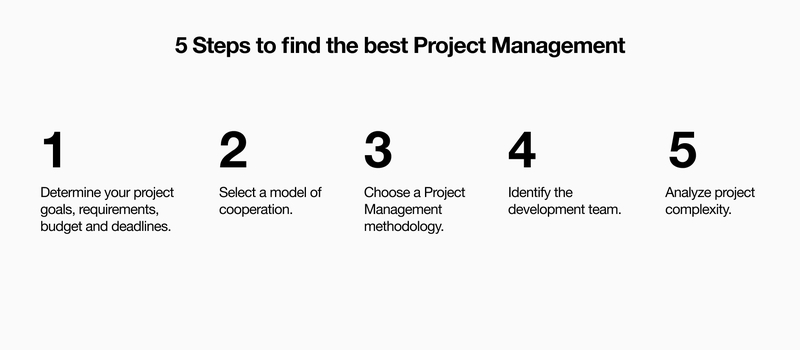
Credit: www.exposit.com
Usability And User Interface
Choosing the right project management software involves careful consideration of usability and user interface. A user-friendly interface can boost productivity. Teams spend less time learning and more time working.
Simplicity Meets Functionality
Software should be simple yet functional. Look for features that enhance team collaboration. A clean interface helps users focus on tasks.
- Intuitive Navigation: Easy-to-use menus and icons.
- Clear Task Management: Simple ways to assign and track tasks.
- Visual Elements: Use charts and graphs for better understanding.
Complex software can overwhelm users. Aim for tools that streamline processes. This balance ensures everyone stays engaged.
Customization Options
Customization boosts usability. Teams can tailor software to fit their needs. Look for tools that allow:
- Custom Dashboards: Personalize views for different roles.
- Adjustable Workflows: Modify processes to suit team practices.
- Flexible Reporting: Generate reports based on specific metrics.
More customization leads to greater satisfaction. Users can adapt tools to their preferences. This flexibility enhances overall team efficiency.
| Feature | Importance |
|---|---|
| Intuitive Navigation | Helps users find features easily |
| Custom Dashboards | Allows personalized user experience |
| Flexible Reporting | Enables tailored insights |
Integration Capabilities
Choosing the right project management software requires attention to integration capabilities. This feature determines how well the software connects with other tools your team uses. Smooth integration boosts productivity and reduces workflow disruptions. Here’s what to consider.
Compatibility With Existing Tools
Chec