

To protect personal information from cyber threats online, use strong passwords and enable two-factor authentication. Regularly update your software and be cautious with sharing personal details.
Ways to Protect Personal Information:In today’s digital age, protecting personal information is crucial. Cyber threats are prevalent, targeting individuals and businesses alike. Data breaches, phishing attacks, and malware can compromise your sensitive information. By implementing effective strategies, you can safeguard your data from malicious actors.
Awareness of online risks is the first step to protection. Simple practices like using strong passwords and avoiding suspicious links can significantly reduce your vulnerability. This blog will explore practical ways to enhance your online security and keep your personal information safe. Taking proactive measures is essential for maintaining your privacy and peace of mind in a connected world.
The Rise Of Cybersecurity Threats
The digital age brings many benefits. Yet, it also brings serious risks. Cybersecurity threats are increasing rapidly. Every day, hackers target individuals and organizations. Protecting personal information is more important than ever.
Recent Data Breach Statistics
Data breaches are a growing concern. Here are some alarming statistics:
| Year | Data Breaches | Records Exposed |
|---|---|---|
| 2020 | 1,108 | 36 billion |
| 2021 | 1,291 | 22 billion |
| 2022 | 1,400 | 50 billion |
These numbers show the scale of the problem. Personal data is at risk like never before.
Common Types Of Cyber Attacks
Understanding cyber attacks helps in prevention. Here are some common types:
- Phishing: Fraudulent emails trick users into sharing data.
- Malware: Harmful software damages or steals data.
- Ransomware: Attackers lock files and demand payment.
- DDoS Attacks: Overload websites, making them unusable.
- Man-in-the-Middle: Intercept communications between parties.
These attacks can happen to anyone. Awareness is the first step to protection.

Credit: online.maryville.edu
Personal Information At Risk
Online activities expose individuals to various cyber threats. Protecting personal information is crucial. Cybercriminals target sensitive data. Understanding what information is at risk is the first step.
What Constitutes Personal Information?
Personal information includes any details that identify you. Here are some examples:
- Name
- Address
- Phone number
- Email address
- Social Security number
- Bank account details
- Credit card information
Each piece of data can be used to steal your identity. Cybercriminals can exploit this information for financial gain.
Consequences Of Personal Data Leaks
Data leaks can have serious effects. Here are some potential consequences:
| Consequence | Description |
|---|---|
| Identity Theft | Criminals may impersonate you to commit fraud. |
| Financial Loss | Unauthorized transactions can drain your bank account. |
| Credit Damage | Fraudulent activity can harm your credit score. |
| Emotional Stress | Dealing with identity theft can be very stressful. |
Taking steps to protect personal information is essential. Being aware of these risks helps maintain your online safety.
Strong Passwords: First Line Of Defense
Strong passwords act as your first line of defense against cyber threats. They protect your personal information from unauthorized access. Using weak passwords increases your risk of identity theft. Creating a robust password is vital for online safety.
Crafting A Robust Password
A strong password is long and complex. It should contain a mix of:
- Uppercase letters
- Lowercase letters
- Numbers
- Special characters (e.g., !, @, #)
Here are some tips for crafting a strong password:
- Use at least 12 characters.
- Avoid common words and phrases.
- Don’t use easily guessed information like birthdays.
- Consider using a passphrase. Combine random words.
Managing Passwords Effectively
Managing passwords can be challenging. Here are effective strategies:
- Use a password manager. It securely stores passwords.
- Change passwords regularly. Update them every 3-6 months.
- Enable two-factor authentication (2FA). This adds extra security.
Track your passwords with a simple table:
| Website | Password | Last Updated |
|---|---|---|
| Example.com | G3@rden!Fl0wer2 | 2023-01-15 |
| BankSite.com | SecureP@ss123! | 2023-02-20 |
Follow these strategies to keep your passwords secure. Protecting your personal information is essential. Strong passwords are a simple yet effective defense.
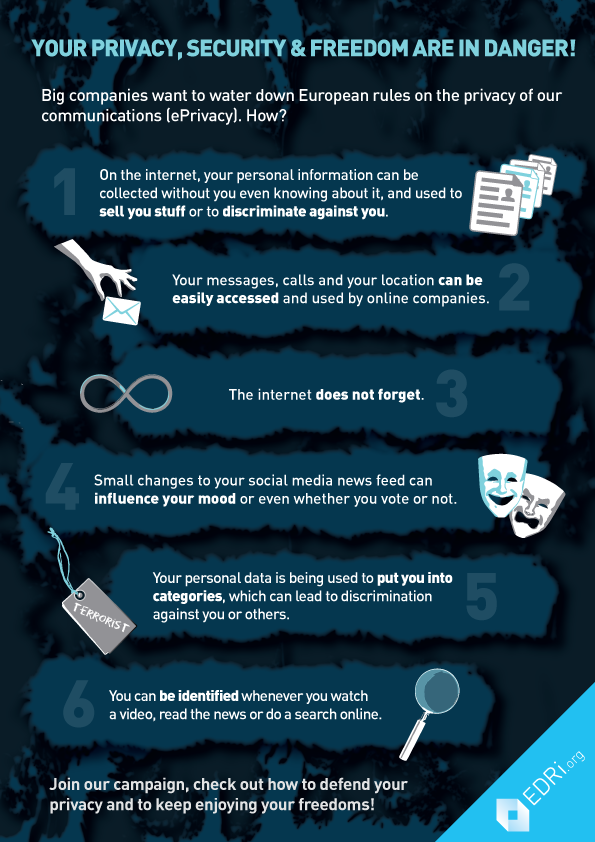
Credit: edri.org
Secure Your Online Presence
Protecting your personal information is crucial today. Cyber threats can harm your privacy. Securing your online presence helps you stay safe.
Privacy Settings On Social Media
Social media platforms collect a lot of information. Adjusting your privacy settings can limit what others see.
- Set your profile to private.
- Control who can send you friend requests.
- Limit the audience for your posts.
Review these settings regularly. Here’s a simple checklist:
- Check who can see your friends list.
- Disable location sharing on posts.
- Turn off tagging by others.
Remember, sharing less is safer. Think before posting personal information.
Safe Online Shopping Practices
Online shopping is convenient but risky. Follow these tips to shop safely:
- Use secure websites (look for HTTPS).
- Check for customer reviews.
- Avoid public Wi-Fi for transactions.
Here’s a table of safe payment methods:
| Payment Method | Safety Level |
|---|---|
| Credit Card | High |
| Debit Card | Medium |
| PayPal | High |
| Bank Transfer | Low |
Always check your bank statements. Report any suspicious activity immediately.
Recognizing And Avoiding Phishing Scams
Phishing scams trick people into giving away personal information. They often appear as emails or messages from trusted sources. Understanding how to recognize and avoid these scams is crucial for online safety.
Identifying Phishing Attempts
Phishing attempts can be sneaky. Here are key signs to look for:
- Generic Greetings: Emails that say “Dear Customer” instead of your name.
- Urgent Language: Messages that claim you must act quickly.
- Suspicious Links: Hover over links to see the real URL. It may look different.
- Strange Email Addresses: Check the sender’s email closely. It may have extra letters or misspellings.
- Attachments: Unexpected attachments can contain malware.
Best Practices For Email Security
Follow these practices to stay safe from phishing scams:
- Use Strong Passwords: Create complex passwords. Mix letters, numbers, and symbols.
- Enable Two-Factor Authentication: This adds an extra layer of security.
- Keep Software Updated: Install updates for your operating system and apps.
- Verify Requests: Always confirm requests for personal info directly with the company.
- Report Phishing: Notify your email provider about phishing attempts.
Using these steps can help keep your personal information safe. Stay alert and informed to avoid falling victim to phishing scams.
Regular Software Updates And Patches
Keeping your software updated is crucial for online safety. Software updates fix security gaps. They also improve performance and add new features. Skipping updates can expose you to cyber threats.
Importance Of Software Updates
Software updates are vital for protecting personal information. Here are some key reasons:
- Fix Vulnerabilities: Updates close security holes.
- Enhance Security: New features often include better security tools.
- Improve Performance: Updates can speed up your device.
- Stay Compatible: Updated software works well with new applications.
Ignoring updates can lead to severe risks. Cybercriminals exploit outdated software. Regular updates keep your information safe.
Automating Updates For Better Security
Automating software updates is a smart choice. It ensures you never miss an important update. Here’s how to do it:
- Go to your device settings.
- Find the software update section.
- Enable automatic updates.
Some software allows you to schedule updates. Choose a time when you won’t use your device. This way, updates run smoothly.
Here’s a simple table showing common software types and their update frequency:
| Software Type | Update Frequency |
|---|---|
| Operating System | Monthly |
| Antivirus | Daily |
| Applications | Weekly |
| Browsers | Biweekly |
Automating updates saves time and boosts security. Regularly check for updates manually, too. This extra step helps catch any missed updates.
Two-factor Authentication: An Extra Security Layer
Two-Factor Authentication (2FA) adds a strong layer of security. It makes online accounts harder to breach. Even if someone steals your password, they still need a second form of verification. This extra step helps protect your personal information.
How Two-factor Authentication Works
Two-Factor Authentication works in two simple steps:
- Something you know: This is your password.
- Something you have: This can be a text message code, an app, or a hardware token.
When you log in, you enter your password first. Then, you receive a unique code. This code is usually sent via text or generated by an app. You enter this code to complete the login process. Without this second code, access is denied. This method greatly reduces the chance of unauthorized access.
Implementing 2fa Across Your Accounts
Setting up Two-Factor Authentication is easy. Follow these steps:
- Check if your service offers 2FA. Most major platforms do.
- Go to your account settings.
- Find the security or privacy section.
- Look for the option labeled “Two-Factor Authentication” or “2FA.”
- Choose your preferred method of receiving codes.
Common methods include:
| Method | Description |
|---|---|
| SMS Text Message | Receive codes via text. |
| Authenticator App | Generate codes on your phone. |
| Receive codes in your email. |
After setting up, test the process. Log out and log back in to see if it works. This extra step ensures your accounts remain secure.
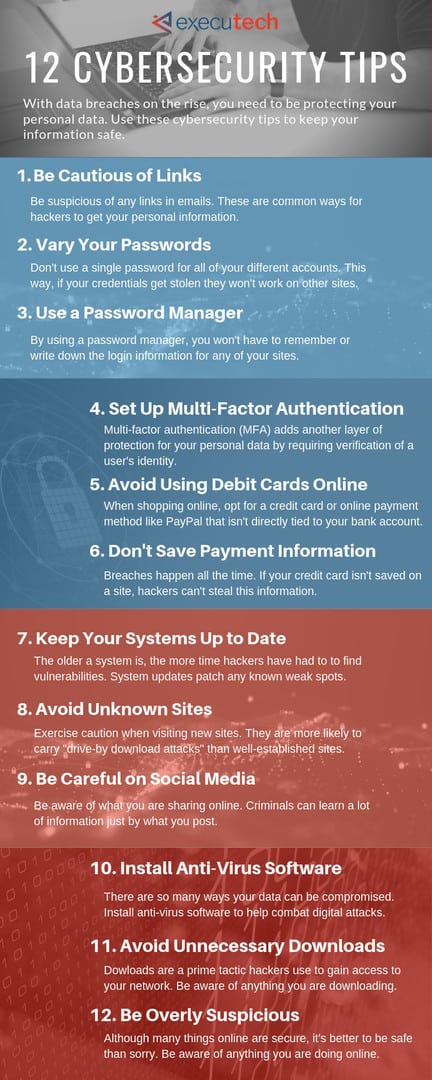
Credit: www.executech.com
Wi-fi Security For Personal Data Protection
Wi-Fi security is essential for protecting personal information online. Cyber threats can easily access unprotected networks. Secure your Wi-Fi to keep your data safe.
Dangers Of Public Wi-fi
Using public Wi-Fi can be risky. Hackers can steal your data easily. Here are some dangers:
- Data Interception: Hackers can capture your data.
- Man-in-the-Middle Attacks: Hackers can insert themselves between you and the network.
- Malware Distribution: Public networks may spread harmful software.
Always think before connecting to public Wi-Fi. Limit sensitive activities on these networks.
Securing Your Home Network
Your home network needs protection. Follow these steps to secure it:
- Change Default Passwords: Use a strong, unique password.
- Enable WPA3 Encryption: This is the latest security standard.
- Disable WPS: Wi-Fi Protected Setup can be a security risk.
- Regularly Update Firmware: Keep your router’s software up to date.
- Hide SSID: Make your network less visible to outsiders.
Here’s a table summarizing these steps:
| Step | Description |
|---|---|
| Change Default Passwords | Use a strong, unique password. |
| Enable WPA3 Encryption | Use the latest security standard. |
| Disable WPS | Reduce security risks. |
| Regularly Update Firmware | Keep your router updated. |
| Hide SSID | Make your network less visible. |
Secure your Wi-Fi at home. Protect your personal data from cyber threats.
Data Encryption: Keeping Your Information Safe
Data encryption is a powerful tool for protecting your personal information. It transforms your data into a code. Only people with a specific key can read it. This makes it much harder for cybercriminals to access your sensitive information.
Understanding how to use data encryption is essential. It helps you safeguard your identity and financial details. Below, we explore the basics of data encryption and the tools available to help you.
Basics Of Data Encryption
Data encryption involves two main processes:
- Encoding: This changes your data into unreadable format.
- Decoding: This converts the data back to its original form.
Encryption uses algorithms to secure data. Here are some common types of encryption:
| Type of Encryption | Description |
|---|---|
| Symmetric Encryption | Uses the same key for encoding and decoding. |
| Asymmetric Encryption | Uses a pair of keys: public and private. |
| End-to-End Encryption | Only sender and receiver can access the data. |
Tools For Encrypting Personal Data
Many tools can help you encrypt your personal data. Here are some popular options:
- VeraCrypt: A free tool for encrypting files and disks.
- BitLocker: Built into Windows, protects data on hard drives.
- AxCrypt: Simple encryption for individual files.
- ProtonMail: Secure email service with built-in encryption.
- Signal: An app for encrypted messaging and calls.
Using these tools can help keep your information safe. Always choose a strong password for your encryption keys. Regularly update your software for better security.
Backup Strategies To Safeguard Your Data
Protecting personal information requires strong backup strategies. Backups ensure your data remains safe from cyber threats. Regular backups can help recover lost files quickly. Choose the right method that fits your needs.
Choosing The Right Backup Solution
Many backup solutions exist. It’s crucial to find one that suits you. Here are some popular options:
- External Hard Drives: Easy to use and affordable.
- Cloud Storage: Access files from anywhere with an internet connection.
- Network Attached Storage (NAS): Provides a private cloud experience.
- Backup Software: Automates the backup process for convenience.
Consider these factors before choosing:
| Factor | External Hard Drive | Cloud Storage | NAS |
|---|---|---|---|
| Cost | Low | Varies | Moderate |
| Accessibility | Local Only | Global | Local & Remote |
| Ease of Use | Simple | Very Easy | Moderate |
Regular Backup Schedules
Setting a backup schedule is essential. Regular backups keep your data safe and updated. Here’s how to create a schedule:
- Decide frequency: Daily, weekly, or monthly.
- Set reminders: Use calendars or apps to remember.
- Test backups: Ensure files are recoverable.
- Adjust as needed: Change schedule based on data changes.
Remember these tips for effective backups:
- Backup critical files first.
- Use multiple backup methods for extra safety.
- Keep backups in different locations.
Stay proactive. Protect your data from cyber threats with regular backups.
Educate Yourself: Staying Informed About Cybersecurity
Understanding cybersecurity is essential for protecting your personal information. Cyber threats evolve constantly. Staying informed helps you recognize risks and defend against them.
Resources For Cybersecurity Education
Many resources are available to boost your cybersecurity knowledge. Here are some valuable options:
- Online Courses: Websites like Coursera and Udemy offer courses.
- Podcasts: Listen to cybersecurity podcasts for updates.
- Books: Read books about cybersecurity basics.
- Webinars: Join webinars hosted by experts.
- Blogs: Follow cybersecurity blogs for tips and news.
Keeping Up With Security Trends
Staying updated on security trends is crucial. Here are some effective ways:
- Follow Cybersecurity News: Read reputable news websites.
- Join Online Forums: Participate in discussions on platforms like Reddit.
- Subscribe to Newsletters: Get daily or weekly updates from experts.
- Attend Conferences: Network with professionals and learn about innovations.
Knowledge is power. Equip yourself with information to combat cyber threats.
Creating A Personal Cybersecurity Plan
Cybersecurity is essential for protecting your personal information. A personal cybersecurity plan helps you stay safe online. It reduces risks and keeps your data secure. Follow these steps to create an effective plan.
Steps To Develop A Cybersecurity Strategy
- Identify Your Assets: List all devices and accounts.
- Assess Risks: Understand potential threats to your data.
- Set Goals: Decide what you want to protect.
- Choose Security Tools: Use antivirus software and firewalls.
- Establish Strong Passwords: Create unique passwords for each account.
- Enable Two-Factor Authentication: Add an extra layer of security.
Evaluating And Updating Your Plan
Regularly review your cybersecurity plan. This keeps your information safe from new threats.
- Schedule Reviews: Check your plan every six months.
- Stay Informed: Follow the latest cybersecurity news.
- Update Tools: Ensure your software is up to date.
- Test Your Strategy: Simulate attacks to find weaknesses.
Use a table to track your updates:
| Review Date | Changes Made | Next Review Date |
|---|---|---|
| 01/01/2023 | Updated passwords | 07/01/2023 |
| 07/01/2023 | Installed new antivirus | 01/01/2024 |
Keep your plan flexible. Adapt it as technology changes. Protect your personal information effectively.
Frequently Asked Questions
How Can I Safeguard My Online Privacy?
To safeguard your online privacy, use strong, unique passwords for each account. Enable two-factor authentication whenever possible. Regularly update your software and devices to patch security vulnerabilities. Be cautious when sharing personal information on social media and avoid clicking on suspicious links or emails.
What Are Effective Methods To Avoid Phishing Attacks?
To avoid phishing attacks, always verify the sender’s email address before clicking links. Look for signs of phishing, such as poor grammar and urgent requests. Use security software that offers phishing protection. Educate yourself on common phishing tactics to better recognize potential threats.
Why Is It Important To Use Vpns?
Using a Virtual Private Network (VPN) encrypts your internet connection. This adds a layer of security, making it harder for hackers to intercept your data. It also masks your IP address, enhancing your online anonymity. A VPN is essential for safe browsing, especially on public Wi-Fi networks.
How Do I Recognize Secure Websites?
To recognize secure websites, look for “https://” in the URL, where the “s” stands for secure. A padlock icon in the address bar indicates that the site uses encryption. Avoid entering personal information on sites that don’t have these security features.
Always verify the site’s legitimacy before proceeding.
Conclusion
Protecting your personal information online is essential for your safety. Implementing strong passwords and enabling two-factor authentication are effective measures. Regularly updating your software can also minimize risks. Stay vigilant against phishing attempts and be mindful of what you share.
Prioritizing your online security will help keep your personal data safe.


Leave a Reply