
Best network security practices for small businesses include implementing strong passwords and regular software updates. Additionally, employee training on phishing and other threats is crucial.
Small businesses often face unique challenges in network security. Limited resources and expertise can leave them vulnerable to cyberattacks. Adopting effective security practices is essential for safeguarding sensitive information. Strong passwords and regular updates form the backbone of a solid defense.
Employee awareness plays a vital role in preventing breaches. Implementing firewalls and using secure connections also enhance protection. Small businesses can benefit from creating an incident response plan. This preparation helps them react quickly if a breach occurs. By prioritizing network security, small businesses can foster trust and protect their reputation in an increasingly digital world.
Introduction To Network Security For Small Businesses
Network security is vital for small businesses. It protects sensitive data from cyber threats. Small businesses often lack resources to defend against attacks. Understanding network security helps mitigate risks. This guide covers essential practices to keep your business safe.
The Importance Of Cybersecurity
Cybersecurity is crucial for every small business. Protecting data builds trust with customers. A security breach can lead to financial loss and reputation damage. Here are key reasons why cybersecurity matters:
- Data Protection: Safeguard sensitive information like customer details.
- Business Continuity: Ensure operations continue smoothly after an attack.
- Legal Compliance: Meet regulations to avoid fines.
- Customer Trust: Maintain loyalty by securing their information.
Common Threats Faced By Small Businesses
Small businesses face various cyber threats. Understanding these threats helps in prevention. Here are some common ones:
| Threat Type | Description |
|---|---|
| Phishing Attacks | Fraudulent emails trick users into giving data. |
| Malware | Malicious software that damages or steals data. |
| Ransomware | Holds data hostage for payment. |
| DDoS Attacks | Overwhelm networks, causing downtime. |
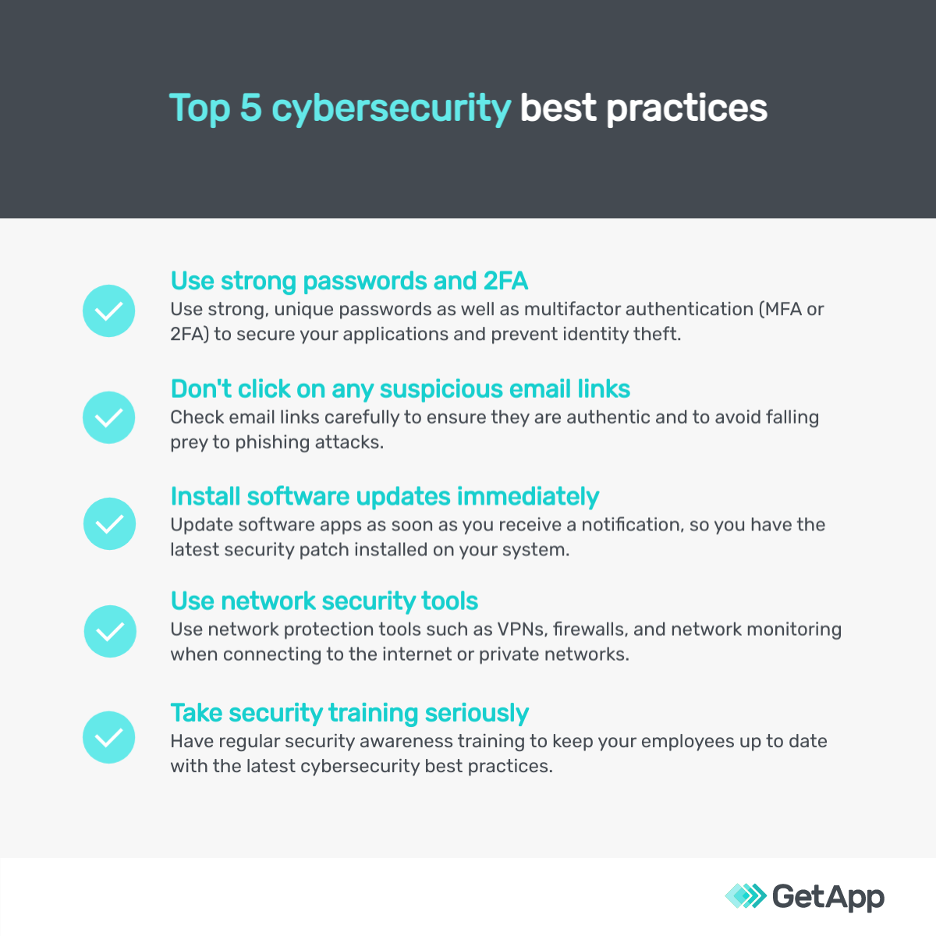
Recognizing these threats is the first step. Implementing security measures will help reduce risks.
Credit: www.getapp.com
Essential Security Measures
Small businesses face many security threats. Implementing essential security measures helps protect sensitive data. These measures are crucial to maintaining customer trust and business integrity. Below are some key security practices every small business should adopt.
Firewall Implementation
A firewall acts as a barrier between your network and potential threats. It monitors incoming and outgoing traffic. Here are some key points about firewalls:
- Block unauthorized access to your network.
- Inspect data packets for malicious content.
- Provide alerts for suspicious activities.
Consider these types of firewalls:
| Type of Firewall | Features |
|---|---|
| Packet Filtering | Checks data packets against rules. |
| Stateful Inspection | Tracks active connections for better security. |
| Proxy Firewall | Acts as an intermediary between users and the internet. |
Antivirus And Anti-malware Solutions
Antivirus and anti-malware software protect against malicious software. These programs detect, quarantine, and remove threats. They keep your systems running smoothly. Here’s how to choose the right solution:
- Look for real-time scanning features.
- Ensure regular updates to tackle new threats.
- Select a user-friendly interface for easy management.
Key benefits of antivirus and anti-malware solutions include:
- Protection against viruses, worms, and Trojans.
- Safeguarding sensitive customer information.
- Reducing downtime caused by malware infections.
Password Policies And Management
Effective password policies are essential for small businesses. They protect sensitive data and ensure network security. Proper management of passwords can prevent unauthorized access.
Creating Strong Passwords
Strong passwords are the first line of defense. Here are key tips for creating them:
- Use at least 12 characters.
- Combine letters, numbers, and symbols.
- Avoid common words and phrases.
- Do not use personal information.
- Change passwords regularly.
Consider using a passphrase. A passphrase is a sequence of words. For example, “BlueSky13GoldenSun!” is strong and memorable.
Utilizing Password Managers
Password managers simplify password management. They store and encrypt passwords securely. Users only need to remember one master password.
Here are benefits of using password managers:
| Benefit | Description |
|---|---|
| Security | Encrypts all stored passwords. |
| Convenience | Automatically fills in passwords. |
| Organization | Stores all passwords in one place. |
| Audit | Checks password strength and reuse. |
Popular password managers include:
- LastPass
- 1Password
- Dashlane
- Bitwarden
Investing in a good password manager boosts security. It reduces the risk of breaches and enhances overall network safety.
Regular Software Updates
Regular software updates are essential for small businesses. They help protect against threats. Outdated software can be an easy target for hackers. Keeping software up to date reduces risks and improves performance.
Benefits Of Patch Management
Patch management refers to updating software regularly. It offers several important benefits:
- Enhanced Security: Fixes vulnerabilities that hackers exploit.
- Improved Performance: Updates often include performance enhancements.
- Compliance: Meets industry standards and regulations.
- Reduced Downtime: Prevents issues that can disrupt business operations.
Implementing patch management is a smart move. It safeguards your business’s sensitive information. Regular updates also build customer trust.
Automating Update Processes
Automating updates can save time and effort. Small businesses often lack resources for manual updates. Automation ensures updates happen on time.
Consider these key points for automation:
- Use Reliable Software: Choose software with automatic update features.
- Schedule Updates: Set a regular update schedule that suits your business.
- Monitor Updates: Keep track of successful and failed updates.
Automation reduces human error. It ensures all software stays current. This keeps your business secure and efficient.
Employee Training And Awareness
Employee training is vital for strong network security. Educated staff can spot threats quickly. They understand their role in protecting company data. Awareness reduces risks and boosts security.
Educating Staff On Security Protocols
Teaching staff about security protocols is essential. Here are key areas to cover:
- Password Management: Use strong, unique passwords.
- Data Handling: Know how to store and share sensitive data.
- Device Security: Secure devices with antivirus software.
- Remote Work Safety: Protect data when working from home.
Regular workshops and training sessions help reinforce these topics. Create engaging materials to keep staff interested. Use videos, quizzes, and presentations for effective learning.
Simulated Phishing Exercises
Phishing attacks are a major threat to small businesses. Simulated phishing exercises prepare employees for real attacks. Here’s how to implement them:
- Create fake phishing emails.
- Send them to staff as tests.
- Track responses and identify who clicked links.
- Provide feedback and training for those who fell for it.
Regular exercises help staff recognize phishing attempts. They build confidence and improve overall security awareness. Use this method to strengthen your team’s skills.
Credit: www.kloud9it.com
Secure Wi-fi Networks
Securing your Wi-Fi network is crucial for small businesses. A strong Wi-Fi connection protects sensiti