
To secure remote access for employees, implement a Virtual Private Network (VPN) and enforce strong password policies. Regularly update security protocols and provide employee training on safe practices.
How to Secure Remote Access for Employees:In today’s digital workplace, remote access has become essential. Companies must prioritize security to protect sensitive information and maintain productivity. With employees working from various locations, vulnerabilities can increase significantly. A robust security strategy can mitigate risks associated with remote access.
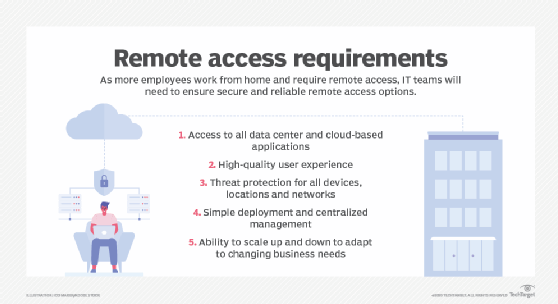
Businesses should utilize technologies like VPNs, two-factor authentication, and secure access gateways. Training employees on best practices further strengthens security. By establishing a comprehensive security framework, organizations can ensure safe and efficient remote work environments. This approach not only protects data but also fosters trust among employees and clients alike, reinforcing the organization’s commitment to security.
The Rise Of Remote Work
Remote work has changed how we view jobs. More companies now support flexible work environments. Employees enjoy the freedom to work from anywhere. This shift has both benefits and challenges. Understanding these elements is vital for success.
Shifts In Work Culture
The traditional office setup is fading. Many businesses embrace a hybrid model. This model combines remote and in-office work. Employees appreciate this flexibility.
- Improved work-life balance
- Increased productivity
- Access to global talent
Companies must adapt to new expectations. Trust and communication become key factors. Regular check-ins help maintain team spirit.
Cybersecurity Challenges
Remote work brings unique cybersecurity challenges. Employees often use personal devices. This practice increases the risk of data breaches.
| Challenge | Description |
|---|---|
| Unsecured Networks | Public Wi-Fi can expose sensitive data. |
| Weak Passwords | Simple passwords are easy to crack. |
| Phishing Attacks | Employees may fall for fake emails. |
To combat these issues, companies must implement strong security measures.
- Use Virtual Private Networks (VPNs).
- Educate employees about security best practices.
- Require multi-factor authentication.
These steps help protect sensitive information and ensure safe remote access.
Credit: www.splashtop.com
Basics Of Remote Access Security
Securing remote access for employees is crucial. This ensures data safety and privacy. Understanding the basics helps organizations protect sensitive information.
Defining Remote Access
Remote access allows employees to connect to their company’s network from outside. This can be done via:
- Laptops
- Smartphones
- Tablets
Common methods include:
- Virtual Private Networks (VPNs)
- Remote Desktop Protocol (RDP)
- Cloud services
Each method has unique security features. Choose one that fits your organization’s needs.
Common Vulnerabilities
Remote access poses various security risks. Recognizing these vulnerabilities is the first step. Some common vulnerabilities include:
| Vulnerability | Description |
|---|---|
| Weak Passwords | Easy-to-guess passwords can lead to unauthorized access. |
| Outdated Software | Old software can have unpatched security flaws. |
| Unsecured Connections | Public Wi-Fi networks can expose sensitive data. |
| Phishing Attacks | Employees may unknowingly share credentials with attackers. |
Addressing these vulnerabilities strengthens remote access security. Regular training helps employees recognize threats.
Establishing A Secure Connection
Securing remote access for employees is crucial for business safety. A secure connection protects sensitive information. Employees need reliable methods to access company resources. This section covers key strategies.
The Role Of Vpns
A Virtual Private Network (VPN) creates a secure tunnel for data. It encrypts information and hides the user’s IP address. This prevents unauthorized access to company networks.
- Encryption: VPNs encrypt data, making it unreadable to hackers.
- Remote Access: Employees connect securely from any location.
- Privacy: VPNs mask user locations, enhancing privacy.
Secure Wi-fi Protocols
Using secure Wi-Fi protocols is essential. It protects data transmitted over wireless networks. Two main protocols stand out:
| Protocol | Features |
|---|---|
| WPA2 | Strong encryption and authentication methods. |
| WPA3 | Improved security features over WPA2. |
Always use the latest protocols for maximum security. Encourage employees to avoid public Wi-Fi for work tasks. If they must use it, a VPN is essential.
Employee Authentication Strategies
Securing remote access for employees begins with effective authentication. Strong employee authentication strategies protect sensitive data. They ensure that only authorized personnel can access company resources.
Password Policies
Strong password policies are essential for security. Here are key elements to include:
- Minimum Length: Require passwords to be at least 12 characters.
- Complexity: Use a mix of uppercase, lowercase, numbers, and symbols.
- Regular Updates: Require employees to change passwords every 90 days.
- Prohibit Common Passwords: Block easily guessable passwords like “123456” or “password.”
Implementing these policies reduces the risk of unauthorized access. Educate employees on creating secure passwords. Encourage them to avoid using the same password across multiple sites.
Two-factor Authentication
Two-factor authentication (2FA) adds an extra layer of security. It requires users to verify their identity with something they have. This could be a mobile device or an authentication app.
Here are common methods for 2FA:
| Method | Description |
|---|---|
| SMS Code | Receive a code via text message. |
| Email Code | Get a code sent to your email. |
| Authentication App | Use apps like Google Authenticator for codes. |
| Hardware Token | Use a physical device that generates codes. |
Encourage employees to enable 2FA on all accounts. This reduces the risk of stolen credentials. It provides peace of mind for both employees and employers.
Securing Endpoints
Securing endpoints is essential for protecting remote access. Endpoints include computers, laptops, and mobile devices. These devices can be vulnerable to cyber threats. Proper security measures can reduce risks significantly.
Antivirus Solutions
Using effective antivirus solutions is crucial for endpoint security. Here are key features to consider:
- Real-time scanning: Detects threats as they happen.
- Automatic updates: Ensures the software stays current.
- Malware removal: Eliminates harmful software quickly.
- Firewall protection: Blocks unauthorized access.
Choose reputable antivirus software. Regularly review the effectiveness of the solution. Consider using a combination of tools for better protection.
Regular Software Updates
Regular software updates play a vital role in endpoint security. They fix vulnerabilities that hackers can exploit. Follow these steps for efficient updates:
- Enable automatic updates for all software.
- Check for updates weekly.
- Prioritize critical updates immediately.
- Review update logs to track changes.
Outdated software can lead to security breaches. Ensure all applications are up-to-date. This simple step can significantly enhance security.
Credit: www.paloaltonetworks.com
Data Protection Measures
Securing remote access for employees is vital. Data protection measures ensure sensitive information remains safe. These measures include encryption techniques and access control strategies.
Encryption Techniques
Encryption protects data by converting it into a code. Only authorized users can decode it. Here are common encryption techniques:
- Symmetric Encryption: The same key encrypts and decrypts data.
- Asymmetric Encryption: Uses a pair of keys, public and private.
- SSL/TLS: Secures data transmitted over the internet.
Implementing these techniques is essential for protecting sensitive data. Regular updates ensure encryption methods remain strong.
Access Control
Access control limits who can view or use data. It helps prevent unauthorized access. Effective access control measures include:
- User Authentication: Verify users before granting access.
- Role-Based Access Control: Assign permissions based on user roles.
- Two-Factor Authentication: Require two forms of verification.
These strategies help maintain data integrity and confidentiality. Regular audits can help identify and fix vulnerabilities.
| Measure | Purpose | Benefits |
|---|---|---|
| Encryption | Protect data from unauthorized access | Enhances security and builds trust |
| Access Control | Limit data access to authorized users | Reduces risk of data breaches |
Training Employees On Security Best Practices
Training employees on security best practices is vital. It helps protect sensitive data. Regular training reduces risks of breaches and cyber attacks. Employees should know how to stay safe online.
Recognizing Phishing Attempts
Phishing is a common tactic used by cybercriminals. Employees must learn to identify suspicious emails. Here are key signs of phishing:
- Strange Sender: Check the email address carefully.
- Urgent Language: Be wary of urgent requests for information.
- Links and Attachments: Avoid clicking on unknown links or files.
- Spelling Errors: Look for grammar mistakes or odd wording.
Encourage employees to report suspicious emails. This helps the entire organization stay safe.
Safe Internet Habits
Practicing safe internet habits is crucial for security. Here are some effective tips:
- Use Strong Passwords: Create complex passwords. Combine letters, numbers, and symbols.
- Change Passwords Regularly: Update passwords every few months.
- Enable Two-Factor Authentication: Add an extra layer of security.
- Avoid Public Wi-Fi: Use a VPN when accessing sensitive information.
Regular discussions on these topics help reinforce safe practices.
| Safe Internet Habits | Benefits |
|---|---|
| Using Strong Passwords | Prevents unauthorized access. |
| Changing Passwords Regularly | Reduces the risk of old passwords being exploited. |
| Enabling Two-Factor Authentication | Enhances account protection. |
| Avoiding Public Wi-Fi | Minimizes exposure to network attacks. |
Consistent training fosters a culture of security awareness. Employees become the first line of defense.
Credit: www.techtarget.com
Monitoring And Responding To Threats
Securing remote access is vital for any organization. Monitoring and responding to threats ensures data safety. Without proper measures, sensitive information can be at risk. Companies must act swiftly to detect and manage potential risks.
Real-time Threat Detection
Real-time threat detection helps identify issues immediately. It uses tools to monitor network activity constantly.
- Intrusion Detection Systems (IDS): These systems track suspicious activities.
- Log Analysis: Analyzing logs reveals unusual patterns.
- User Behavior Analytics (UBA): This monitors user actions for anomalies.
Implementing these tools can significantly enhance security. They provide alerts for immediate action.
Incident Response Planning
Effective incident response planning is crucial. It prepares teams to handle security breaches.
- Identify: Recognize the threat quickly.
- Contain: Limit the damage from the incident.
- Eradicate: Remove the threat completely.
- Recover: Restore systems and data safely.
- Review: Analyze the incident to improve future responses.
A detailed response plan can save valuable time and resources. Regular training keeps teams prepared for threats.
Leveraging Cloud Services
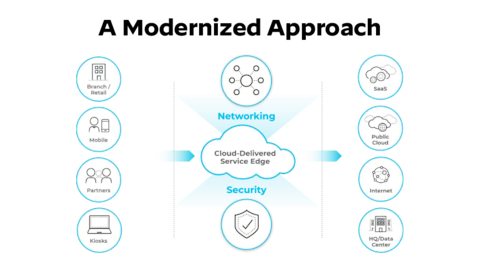
Cloud services offer flexible solutions for secure remote access. They allow employees to connect safely from anywhere. Using the cloud can enhance productivity and security. Organizations can benefit from advanced tools without heavy investment.
Cloud Security Advantages
Cloud services provide numerous security advantages:
- Data Encryption: Protects data both in transit and at rest.
- Regular Updates: Cloud providers frequently update their security protocols.
- Scalability: Adjust security measures as your team grows.
- Access Control: Set permissions for who can access what data.
- Automatic Backups: Safeguard data with regular backups.
Choosing The Right Provider
Selecting a cloud service provider requires careful consideration:
| Criteria | Questions to Ask |
|---|---|
| Security Features | What encryption methods do you use? |
| Compliance | Are you compliant with industry standards? |
| Support | What kind of customer support do you offer? |
| Cost | How do you structure your pricing? |
| Performance | What is your uptime guarantee? |
Choose a provider with a strong reputation. Look for positive reviews and case studies. Test their service with a trial period. Ensure they can meet your specific needs.
Implementing Security Policies
Securing remote access for employees is crucial. Effective security policies keep data safe. These policies guide employee behavior and set clear expectations. They create a secure environment for all users.
Creating A Remote Work Policy
A strong remote work policy is essential. It outlines rules for employees working from home. Here are key components to include:
- Access Control: Define who can access company data.
- Device Management: Specify which devices can be used.
- Data Protection: Explain how to handle sensitive information.
- Communication Tools: List approved tools for team interaction.
- Reporting Incidents: Establish a procedure for reporting security breaches.
Distributing this policy is vital. Make sure every employee understands it. Hold training sessions to explain its importance. Regular updates keep the policy relevant. Use feedback to improve it continuously.
Regular Security Audits
Conducting regular security audits is critical. They help identify vulnerabilities. Schedule these audits at least twice a year.
Here’s what to focus on during audits:
| Audit Focus Area | Description |
|---|---|
| Access Logs | Review who accessed data and when. |
| Device Security | Check security settings on all devices. |
| Software Updates | Ensure all software is up-to-date. |
| Employee Training | Evaluate training effectiveness for security practices. |
After audits, document findings. Create an action plan for improvements. Share results with relevant teams. Regular audits foster a culture of security awareness.
Future-proofing Remote Access Security
Securing remote access for employees is crucial. As technology evolves, so do cyber threats. Future-proofing your remote access security helps protect sensitive data. Businesses must adopt innovative strategies to stay ahead.
Innovations In Cybersecurity
New technologies improve remote access security. Here are some key innovations:
- Zero Trust Architecture: This model assumes no one is trustworthy. Every access request is verified.
- Multi-Factor Authentication (MFA): MFA adds extra security. It requires more than one form of identification.
- AI and Machine Learning: These technologies detect threats faster. They analyze patterns and flag unusual activities.
Preparing For Emerging Threats
Cyber threats are always changing. Preparing for these threats is essential. Here are steps to enhance security:
- Regular Training: Teach employees about security best practices.
- Update Software: Keep all software current. Updates fix security vulnerabilities.
- Conduct Security Audits: Regular audits identify weaknesses.
- Implement VPNs: Virtual Private Networks protect data during remote access.
Staying informed about new threats is vital. Follow cybersecurity news and trends. This knowledge helps in adjusting security measures.
| Threat Type | Description | Prevention Measures |
|---|---|---|
| Phishing Attacks | Deceptive emails to steal information. | Training and email filtering. |
| Malware | Malicious software harming systems. | Regular updates and antivirus software. |
| Ransomware | Data is locked until a ransom is paid. | Backups and employee training. |
Future-proofing remote access security requires continuous effort. Stay proactive to ensure safety for all employees.
Frequently Asked Questions
How Can I Secure Remote Access For Employees?
To secure remote access for employees, implement a Virtual Private Network (VPN). This encrypts data transferred between devices and servers. Additionally, use multi-factor authentication (MFA) for an added layer of security. Regularly update software and educate employees on safe practices.
These steps help protect sensitive information.
What Tools Help Secure Remote Work?
Several tools can enhance remote work security. VPNs encrypt internet connections, while firewalls protect against unauthorized access. Endpoint protection software secures devices from malware. Furthermore, secure file-sharing platforms ensure safe data transfer. Always choose tools that comply with your organization’s security policies for optimal protection.
Is Vpn Necessary For Remote Access?
Yes, a VPN is crucial for remote access. It creates a secure connection over the internet, protecting data from potential threats. Without a VPN, sensitive information can be intercepted by cybercriminals. Additionally, a VPN helps maintain privacy by masking users’ IP addresses, enhancing overall security.
How To Educate Employees About Remote Security?
Educate employees through regular training sessions and workshops. Use real-life examples to illustrate potential risks. Provide guidelines on best practices for remote work security. Share resources like articles and videos that reinforce learning. Encourage open discussions about security concerns to foster a culture of awareness.
Conclusion
Securing remote access for employees is essential for protecting sensitive information. Implementing strong passwords, VPNs, and multi-factor authentication can significantly reduce risks. Regular training on security best practices also empowers your team. Prioritizing these strategies will create a safer remote work environment, ensuring productivity without compromising security.
Stay proactive and vigilant.


Leave a Reply